Try it
Copy the code ↓- Data source
- Decision schema
- Model inference
- Structured result
2 Decision schema 3 typed questions
doc_categorychoiceinvoicecontractresumereceiptotherboundarychoicekeep_wholesplit_at_pageneeds_reviewneeds_humannoulprobability 0–1
3 Model inference typesafe/jev-1.13
Waiting for a run.
4 Structured result
Raw JSON
Run the demo to see the JSON answers, the highlighted pick and the final action.
FLATKEY_API_KEY and run.curl -sS https://router.flatkey.ai/api/alpha/decisions \
-H "Authorization: Bearer $FLATKEY_API_KEY" \
-H "Content-Type: application/json" \
-d '{
"model": "typesafe/jev-1.13",
"state": "Source: inbox PDF upload (LiteParse excerpt)\nFile: scan_batch_1042.pdf pages 3–5\nOptional: LlamaParse fallback unused\n\n--- page 3 (end of current region) ---\nACME Supplies LLC\nINVOICE #INV-88421\nBill To: Northwind Labs\nItem: Widget kit x12 $480.00\nTax: $38.40\nTotal due: $518.40\nPayment terms: Net 30\nThank you for your business.\nPage 3 of 3\n\n--- page 4 (start of next region) ---\nJORDAN LEE\nSoftware Engineer\njordan.lee@example.com | San Francisco, CA\nEXPERIENCE\nStaff Engineer — Contoso (2021–present)\n- Built typed decision gates for document pipelines\nEDUCATION\nB.S. Computer Science — State University\nSKILLS: TypeScript, Python, PDF tooling\n\nTask: classify the primary doc in this seam window and decide keep_whole / split_at_page / needs_review.\nPolicy: auto-split only at high confidence; never invent a second document from weak OCR.",
"questions": {
"doc_category": {
"type": "choice",
"instructions": "Classify the primary document type represented by this parsed excerpt for inbox routing. Prefer the document that dominates the excerpt; if two types clearly collide at a seam, still pick the best single label and rely on boundary for the split.",
"criteria": {
"invoice": "Bill or invoice with vendor, amounts, line items, or payment terms",
"contract": "Agreement, MSA, SOW, or signed terms with parties and obligations",
"resume": "CV or resume with experience, education, or skills sections",
"receipt": "Payment receipt, expense slip, or short proof-of-purchase",
"other": "Correspondence or a document that does not fit the labels above"
}
},
"boundary": {
"type": "choice",
"instructions": "Decide whether this page or region is a multi-document boundary that should split the PDF. Look for abrupt topic, layout, letterhead, or pagination resets between adjacent excerpts.",
"criteria": {
"keep_whole": "The excerpt is continuous with one document; do not split here",
"split_at_page": "A clear new document starts at this page/region; split here",
"needs_review": "Signals conflict or OCR is too weak; a human should confirm before splitting"
}
},
"needs_human": {
"type": "noul",
"instructions": "A human should confirm classification or the split before downstream routing or file mutation."
}
}
}'// Node.js 18+ (built-in fetch). Run: FLATKEY_API_KEY=... node jev.mjs
const body = {
"model": "typesafe/jev-1.13",
"state": "Source: inbox PDF upload (LiteParse excerpt)\nFile: scan_batch_1042.pdf pages 3–5\nOptional: LlamaParse fallback unused\n\n--- page 3 (end of current region) ---\nACME Supplies LLC\nINVOICE #INV-88421\nBill To: Northwind Labs\nItem: Widget kit x12 $480.00\nTax: $38.40\nTotal due: $518.40\nPayment terms: Net 30\nThank you for your business.\nPage 3 of 3\n\n--- page 4 (start of next region) ---\nJORDAN LEE\nSoftware Engineer\njordan.lee@example.com | San Francisco, CA\nEXPERIENCE\nStaff Engineer — Contoso (2021–present)\n- Built typed decision gates for document pipelines\nEDUCATION\nB.S. Computer Science — State University\nSKILLS: TypeScript, Python, PDF tooling\n\nTask: classify the primary doc in this seam window and decide keep_whole / split_at_page / needs_review.\nPolicy: auto-split only at high confidence; never invent a second document from weak OCR.",
"questions": {
"doc_category": {
"type": "choice",
"instructions": "Classify the primary document type represented by this parsed excerpt for inbox routing. Prefer the document that dominates the excerpt; if two types clearly collide at a seam, still pick the best single label and rely on boundary for the split.",
"criteria": {
"invoice": "Bill or invoice with vendor, amounts, line items, or payment terms",
"contract": "Agreement, MSA, SOW, or signed terms with parties and obligations",
"resume": "CV or resume with experience, education, or skills sections",
"receipt": "Payment receipt, expense slip, or short proof-of-purchase",
"other": "Correspondence or a document that does not fit the labels above"
}
},
"boundary": {
"type": "choice",
"instructions": "Decide whether this page or region is a multi-document boundary that should split the PDF. Look for abrupt topic, layout, letterhead, or pagination resets between adjacent excerpts.",
"criteria": {
"keep_whole": "The excerpt is continuous with one document; do not split here",
"split_at_page": "A clear new document starts at this page/region; split here",
"needs_review": "Signals conflict or OCR is too weak; a human should confirm before splitting"
}
},
"needs_human": {
"type": "noul",
"instructions": "A human should confirm classification or the split before downstream routing or file mutation."
}
}
};
const res = await fetch("https://router.flatkey.ai/api/alpha/decisions", {
method: "POST",
headers: {
Authorization: `Bearer ${process.env.FLATKEY_API_KEY}`,
"Content-Type": "application/json",
},
body: JSON.stringify(body),
});
if (!res.ok) throw new Error(`Jev request failed: ${res.status} ${await res.text()}`);
const { answers, usage } = await res.json();
console.log(JSON.stringify(answers, null, 2), usage);# Python 3.8+ (pip install requests). Run: FLATKEY_API_KEY=... python jev.py
import json, os, requests
body = json.loads(r"""{
"model": "typesafe/jev-1.13",
"state": "Source: inbox PDF upload (LiteParse excerpt)\nFile: scan_batch_1042.pdf pages 3–5\nOptional: LlamaParse fallback unused\n\n--- page 3 (end of current region) ---\nACME Supplies LLC\nINVOICE #INV-88421\nBill To: Northwind Labs\nItem: Widget kit x12 $480.00\nTax: $38.40\nTotal due: $518.40\nPayment terms: Net 30\nThank you for your business.\nPage 3 of 3\n\n--- page 4 (start of next region) ---\nJORDAN LEE\nSoftware Engineer\njordan.lee@example.com | San Francisco, CA\nEXPERIENCE\nStaff Engineer — Contoso (2021–present)\n- Built typed decision gates for document pipelines\nEDUCATION\nB.S. Computer Science — State University\nSKILLS: TypeScript, Python, PDF tooling\n\nTask: classify the primary doc in this seam window and decide keep_whole / split_at_page / needs_review.\nPolicy: auto-split only at high confidence; never invent a second document from weak OCR.",
"questions": {
"doc_category": {
"type": "choice",
"instructions": "Classify the primary document type represented by this parsed excerpt for inbox routing. Prefer the document that dominates the excerpt; if two types clearly collide at a seam, still pick the best single label and rely on boundary for the split.",
"criteria": {
"invoice": "Bill or invoice with vendor, amounts, line items, or payment terms",
"contract": "Agreement, MSA, SOW, or signed terms with parties and obligations",
"resume": "CV or resume with experience, education, or skills sections",
"receipt": "Payment receipt, expense slip, or short proof-of-purchase",
"other": "Correspondence or a document that does not fit the labels above"
}
},
"boundary": {
"type": "choice",
"instructions": "Decide whether this page or region is a multi-document boundary that should split the PDF. Look for abrupt topic, layout, letterhead, or pagination resets between adjacent excerpts.",
"criteria": {
"keep_whole": "The excerpt is continuous with one document; do not split here",
"split_at_page": "A clear new document starts at this page/region; split here",
"needs_review": "Signals conflict or OCR is too weak; a human should confirm before splitting"
}
},
"needs_human": {
"type": "noul",
"instructions": "A human should confirm classification or the split before downstream routing or file mutation."
}
}
}""")
res = requests.post(
"https://router.flatkey.ai/api/alpha/decisions",
headers={"Authorization": f"Bearer {os.environ['FLATKEY_API_KEY']}"},
json=body,
timeout=60,
)
res.raise_for_status()
data = res.json()
print(json.dumps(data["answers"], indent=2), data.get("usage"))No Flatkey key yet? Get one for Jev 1.13 →
About this use case
Who / when
Audience
- builders of document inboxes who need typed classify + split decisions
- teams combining LiteParse / OCR with a cheap auditable decider
- anyone who wants auto-route and auto-split only when boundary confidence is high
Triggers
- an uploaded PDF may contain more than one document glued together
- you need inbox routing by category (invoice, contract, resume, receipt) before downstream tools
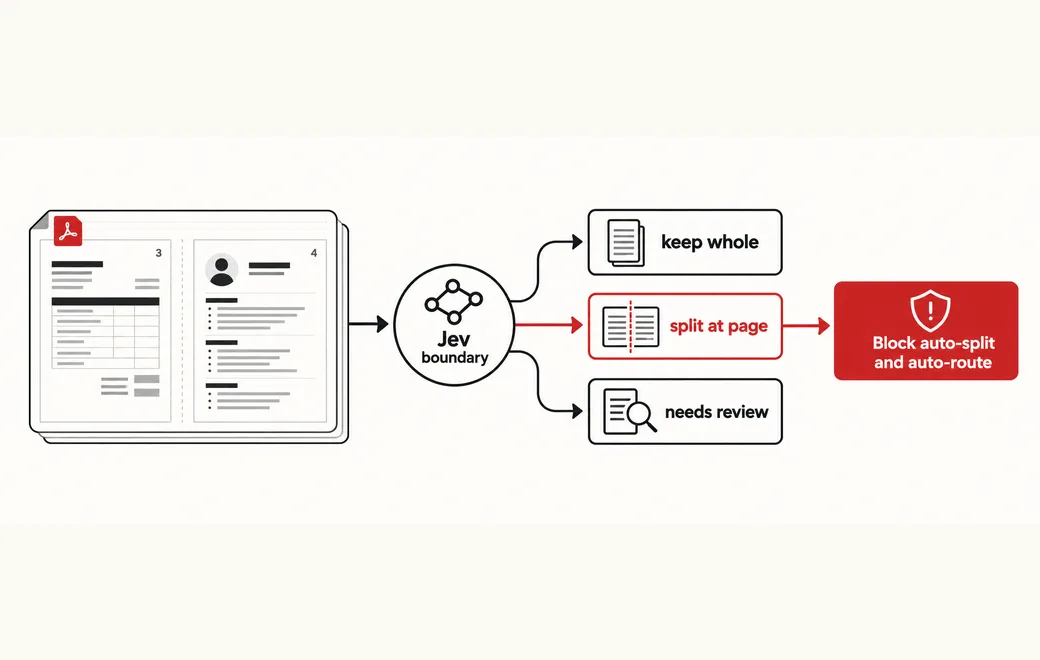
- page-boundary candidates need a typed keep_whole / split_at_page / needs_review call
- auto-split should only run when confidence is high and needs_human is false
The workflow
- 01Parse excerptLiteParse / OCR page textInput
- 02Doc categoryinvoice / contract / resume / …Jev
- 03Boundarykeep_whole / split / reviewJev
- 04Enforce gateRoute, split, or escalateYour code
Question shape
{
  "doc_category": {
    "type": "choice",
    "instructions": "Classify the primary document type represented by this parsed excerpt for inbox routing. Prefer the document that dominates the excerpt; if two types clearly collide at a seam, still pick the best single label and rely on boundary for the split.",
    "criteria": {
      "invoice": "Bill or invoice with vendor, amounts, line items, or payment terms",
      "contract": "Agreement, MSA, SOW, or signed terms with parties and obligations",
      "resume": "CV or resume with experience, education, or skills sections",
      "receipt": "Payment receipt, expense slip, or short proof-of-purchase",
      "other": "Correspondence or a document that does not fit the labels above"
    }
  },
  "boundary": {
    "type": "choice",
    "instructions": "Decide whether this page or region is a multi-document boundary that should split the PDF. Look for abrupt topic, layout, letterhead, or pagination resets between adjacent excerpts.",
    "criteria": {
      "keep_whole": "The excerpt is continuous with one document; do not split here",
      "split_at_page": "A clear new document starts at this page/region; split here",
      "needs_review": "Signals conflict or OCR is too weak; a human should confirm before splitting"
    }
  },
  "needs_human": {
    "type": "noul",
    "instructions": "A human should confirm classification or the split before downstream routing or file mutation."
  }
}
Gate policy
≥ 0.90
Auto-route by doc_category and auto-split only when boundary is split_at_page and needs_human is false. Auto keep_whole when boundary is keep_whole at high confidence.
0.65–0.90
Hold for review; surface top category and boundary candidates. Do not mutate the PDF yet.
< 0.65
Block auto-split and auto-route; escalate when boundary is needs_review, confidence is low, or needs_human is true.
Failure modes
Pre-launch checks before you trust auto-routing:
- Splitting on every new page header without a typed boundary judgment;
- Auto-splitting when boundary confidence is medium/low because the parser "looks done";
- Routing the whole multi-doc blob as a single invoice when a resume starts mid-file;
- Letting LlamaParse / LiteParse alone decide category without an inspectable Choice call;
- Mutating the PDF before needs_human is checked on ambiguous seams;
FAQ
Why use Jev for inbox classify and multi-doc PDF split?
Parsers extract text; they do not give you an auditable keep_whole / split_at_page / needs_review decision. A separate typed Choice + Noul call on short LiteParse excerpts makes category routing and seam splits cheap to eval and easy to fail closed in code when the boundary is unclear.
How should classify and split gates cascade?
Auto-route and auto-split only on high confidence with a clear category, boundary split_at_page (or keep_whole), and needs_human false. Mid band: hold and show candidates. Low band, needs_review, or needs_human: block file mutation and escalate.
Can I bring my own API key?
Yes. Try the free demo above without signing in. To run it live on your own text, sign in with Google and connect a Flatkey or OpenRouter key (a quick test call runs when you save it). Manage or delete it anytime under Dashboard → BYOK. Keys are stored encrypted on the server, used only for runs you trigger, and never sent back to the browser. Need a Flatkey key? Get one for Jev 1.13 on Flatkey.
Is this the official TypeSafe Jev product page?
No. jev-llm.com is an independent research and practice site. Verify pricing, models and terms at the original TypeSafe sources.
Sources
DOCJEV: LiteParse + Jev category/boundary judgments; inbox classify + multi-doc PDF split; optional LlamaParse.
— @MazuzAsaf View the post on X →
Wire this gate with your own key
Bring your own key through Flatkey / OpenRouter. Keep exact checks in code.