Try it
Copy the code ↓- Data source
- Decision schema
- Model inference
- Structured result
2 Decision schema 3 typed questions
next_actionchoiceclickscrolltypewaitdonetarget_clarityscorenonelowmediumhighneeds_humannoulprobability 0–1
3 Model inference typesafe/jev-1.13
Waiting for a run.
4 Structured result
Raw JSON
Run the demo to see the JSON answers, the highlighted pick and the final action.
FLATKEY_API_KEY and run.curl -sS https://router.flatkey.ai/api/alpha/decisions \
-H "Authorization: Bearer $FLATKEY_API_KEY" \
-H "Content-Type: application/json" \
-d '{
"model": "typesafe/jev-1.13",
"state": "Task: open Privacy settings and turn on \"Do Not Track\".\n\nOCR (visible):\nSettings — Privacy & security\n[ ] Do Not Track\n[x] Safe Browsing\nCookies: Allow all\n[Clear browsing data…]\n[Done]\n\nAccessibility tree (focused window):\n- window \"Settings\"\n - heading \"Privacy & security\"\n - checkbox \"Do Not Track\" checked=false\n - checkbox \"Safe Browsing\" checked=true\n - combobox \"Cookies\" value=\"Allow all\"\n - button \"Clear browsing data…\"\n - button \"Done\"\n\nLast action: opened Settings → Privacy & security.\nPolicy: never clear browsing data without human confirm; prefer named a11y targets.",
"questions": {
"next_action": {
"type": "choice",
"instructions": "Given the OCR text and accessibility-tree snapshot, pick the single best next computer-use action. Prefer precise UI targets named in the a11y tree. Do not invent controls that are not present.",
"criteria": {
"click": "A clear interactive control should be clicked next (button, link, checkbox, tab, menu item)",
"scroll": "The needed control or text is off-screen; scroll to reveal more of the UI first",
"type": "Focus is on (or should move to) an editable field and text must be entered or cleared",
"wait": "The UI is loading, animating, or disabled; wait briefly before acting",
"done": "The stated task is complete; no further computer-use action is needed"
}
},
"target_clarity": {
"type": "score",
"instructions": "How clearly can the next action'\''s UI target be identified from the OCR + accessibility snapshot alone?",
"criteria": [
"none",
"low",
"medium",
"high"
]
},
"needs_human": {
"type": "noul",
"instructions": "A human should take over or confirm before this UI action runs (destructive, payment, permission, or ambiguous target)."
}
}
}'// Node.js 18+ (built-in fetch). Run: FLATKEY_API_KEY=... node jev.mjs
const body = {
"model": "typesafe/jev-1.13",
"state": "Task: open Privacy settings and turn on \"Do Not Track\".\n\nOCR (visible):\nSettings — Privacy & security\n[ ] Do Not Track\n[x] Safe Browsing\nCookies: Allow all\n[Clear browsing data…]\n[Done]\n\nAccessibility tree (focused window):\n- window \"Settings\"\n - heading \"Privacy & security\"\n - checkbox \"Do Not Track\" checked=false\n - checkbox \"Safe Browsing\" checked=true\n - combobox \"Cookies\" value=\"Allow all\"\n - button \"Clear browsing data…\"\n - button \"Done\"\n\nLast action: opened Settings → Privacy & security.\nPolicy: never clear browsing data without human confirm; prefer named a11y targets.",
"questions": {
"next_action": {
"type": "choice",
"instructions": "Given the OCR text and accessibility-tree snapshot, pick the single best next computer-use action. Prefer precise UI targets named in the a11y tree. Do not invent controls that are not present.",
"criteria": {
"click": "A clear interactive control should be clicked next (button, link, checkbox, tab, menu item)",
"scroll": "The needed control or text is off-screen; scroll to reveal more of the UI first",
"type": "Focus is on (or should move to) an editable field and text must be entered or cleared",
"wait": "The UI is loading, animating, or disabled; wait briefly before acting",
"done": "The stated task is complete; no further computer-use action is needed"
}
},
"target_clarity": {
"type": "score",
"instructions": "How clearly can the next action's UI target be identified from the OCR + accessibility snapshot alone?",
"criteria": [
"none",
"low",
"medium",
"high"
]
},
"needs_human": {
"type": "noul",
"instructions": "A human should take over or confirm before this UI action runs (destructive, payment, permission, or ambiguous target)."
}
}
};
const res = await fetch("https://router.flatkey.ai/api/alpha/decisions", {
method: "POST",
headers: {
Authorization: `Bearer ${process.env.FLATKEY_API_KEY}`,
"Content-Type": "application/json",
},
body: JSON.stringify(body),
});
if (!res.ok) throw new Error(`Jev request failed: ${res.status} ${await res.text()}`);
const { answers, usage } = await res.json();
console.log(JSON.stringify(answers, null, 2), usage);# Python 3.8+ (pip install requests). Run: FLATKEY_API_KEY=... python jev.py
import json, os, requests
body = json.loads(r"""{
"model": "typesafe/jev-1.13",
"state": "Task: open Privacy settings and turn on \"Do Not Track\".\n\nOCR (visible):\nSettings — Privacy & security\n[ ] Do Not Track\n[x] Safe Browsing\nCookies: Allow all\n[Clear browsing data…]\n[Done]\n\nAccessibility tree (focused window):\n- window \"Settings\"\n - heading \"Privacy & security\"\n - checkbox \"Do Not Track\" checked=false\n - checkbox \"Safe Browsing\" checked=true\n - combobox \"Cookies\" value=\"Allow all\"\n - button \"Clear browsing data…\"\n - button \"Done\"\n\nLast action: opened Settings → Privacy & security.\nPolicy: never clear browsing data without human confirm; prefer named a11y targets.",
"questions": {
"next_action": {
"type": "choice",
"instructions": "Given the OCR text and accessibility-tree snapshot, pick the single best next computer-use action. Prefer precise UI targets named in the a11y tree. Do not invent controls that are not present.",
"criteria": {
"click": "A clear interactive control should be clicked next (button, link, checkbox, tab, menu item)",
"scroll": "The needed control or text is off-screen; scroll to reveal more of the UI first",
"type": "Focus is on (or should move to) an editable field and text must be entered or cleared",
"wait": "The UI is loading, animating, or disabled; wait briefly before acting",
"done": "The stated task is complete; no further computer-use action is needed"
}
},
"target_clarity": {
"type": "score",
"instructions": "How clearly can the next action's UI target be identified from the OCR + accessibility snapshot alone?",
"criteria": [
"none",
"low",
"medium",
"high"
]
},
"needs_human": {
"type": "noul",
"instructions": "A human should take over or confirm before this UI action runs (destructive, payment, permission, or ambiguous target)."
}
}
}""")
res = requests.post(
"https://router.flatkey.ai/api/alpha/decisions",
headers={"Authorization": f"Bearer {os.environ['FLATKEY_API_KEY']}"},
json=body,
timeout=60,
)
res.raise_for_status()
data = res.json()
print(json.dumps(data["answers"], indent=2), data.get("usage"))No Flatkey key yet? Get one for Jev 1.13 →
About this use case
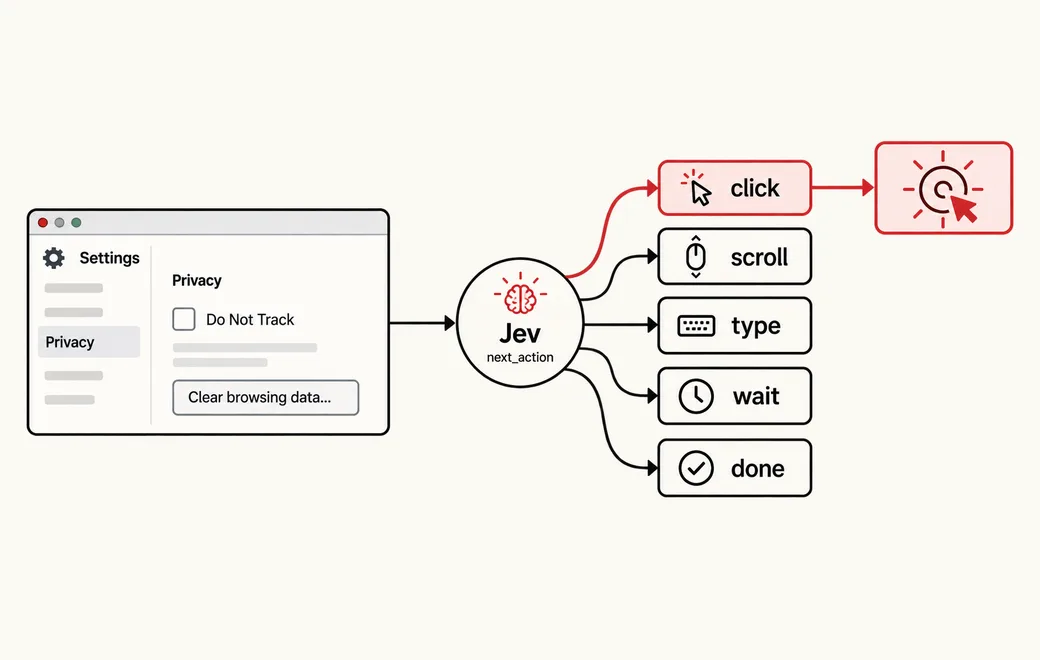
Who / when
Audience
- builders of computer-use / GUI agents who need auditable next-step decisions
- teams combining local OCR and accessibility trees with a typed decider
- anyone who wants high-confidence auto-clicks and mid/low bands that hold or escalate
Triggers
- the agent sees a UI via OCR + a11y but you need a typed next action, not a free-form plan
- you want auto-click only when the target is clear and confidence is high
- risky UI actions (payments, delete, permissions) should force human takeover
- you need every computer-use step inspectable for evals and incident review
The workflow
- 01OCR + a11y stateLocal screen text and accessibility treeInput
- 02Next actionclick / scroll / type / wait / doneJev
- 03Target claritynone / low / medium / highJev
- 04Enforce gateAuto-act, hold, or human takeoverYour code
Question shape
{
  "next_action": {
    "type": "choice",
    "instructions": "Given the OCR text and accessibility-tree snapshot, pick the single best next computer-use action. Prefer precise UI targets named in the a11y tree. Do not invent controls that are not present.",
    "criteria": {
      "click": "A clear interactive control should be clicked next (button, link, checkbox, tab, menu item)",
      "scroll": "The needed control or text is off-screen; scroll to reveal more of the UI first",
      "type": "Focus is on (or should move to) an editable field and text must be entered or cleared",
      "wait": "The UI is loading, animating, or disabled; wait briefly before acting",
      "done": "The stated task is complete; no further computer-use action is needed"
    }
  },
  "target_clarity": {
    "type": "score",
    "instructions": "How clearly can the next action's UI target be identified from the OCR + accessibility snapshot alone?",
    "criteria": [
      "none",
      "low",
      "medium",
      "high"
    ]
  },
  "needs_human": {
    "type": "noul",
    "instructions": "A human should take over or confirm before this UI action runs (destructive, payment, permission, or ambiguous target)."
  }
}
Gate policy
≥ 0.90
Auto-execute only when next_action is click/scroll/type/wait/done, target_clarity is high, and needs_human is false.
0.65–0.90
Hold for review; surface the top action and candidates. Do not auto-click destructive or permission controls.
< 0.65
Block auto-execution; escalate to a human when target_clarity is none/low or needs_human is true.
Failure modes
Pre-launch checks before you trust auto-routing:
- Skipping the a11y tree and clicking from OCR coordinates alone when labels collide;
- Auto-executing when target_clarity is medium/low because the planner "sounds sure";
- Treating destructive buttons (Clear browsing data, Delete, Pay) as normal clicks;
- Inventing controls that are not in the snapshot when the real target is off-screen (should scroll or wait);
- Running type without confirming focus is on the intended editable field;
FAQ
Why gate computer-use with Jev after OCR + a11y?
Pixels-to-action loops are opaque. A separate typed Choice / Score / Noul call on a short OCR + accessibility snapshot makes every next step inspectable, cheap to eval, and easy to fail closed in code when the target is unclear or risky.
How should click / scroll / type / wait / done cascade with confidence?
Auto-execute only on high confidence with high target_clarity and needs_human false. Mid band: hold and show the top action for review. Low band or needs_human: block auto-run and escalate—especially for payments, deletes, and permission dialogs.
How do I call Flatkey for this decision?
POST https://router.flatkey.ai/api/alpha/decisions with Authorization: Bearer <key>, Content-Type: application/json, and body fields state, model (typesafe/jev-1.13), and questions (choice / score / noul). This is not an OpenAI-compatible /v1 chat base. Need a key? Get one for Jev 1.13 on Flatkey.
Can I bring my own API key?
Yes. Try the free demo above without signing in. To run it live on your own text, sign in with Google and connect a Flatkey or OpenRouter key (a quick test call runs when you save it). Manage or delete it anytime under Dashboard → BYOK. Keys are stored encrypted on the server, used only for runs you trigger, and never sent back to the browser. Need a Flatkey key? Get one for Jev 1.13 on Flatkey.
Is this the official TypeSafe Jev product page?
No. jev-llm.com is an independent research and practice site. Verify pricing, models and terms at the original TypeSafe sources.
Sources
Local OCR + Accessibility then Jev picks next click/scroll/text; inspectable computer-use decisions.
— @MazuzAsaf View the post on X →
Wire this gate with your own key
Bring your own key through Flatkey / OpenRouter. Keep exact checks in code.