Try it
Copy the code ↓- Data source
- Decision schema
- Model inference
- Structured result
2 Decision schema 3 typed questions
teamchoicebillingtechnicalsecuritysalesis_angrynoulprobability 0–1urgencyscorelowmediumhigh
3 Model inference typesafe/jev-1.13
Waiting for a run.
4 Structured result
Raw JSON
Run the demo to see the JSON answers, the highlighted pick and the final action.
FLATKEY_API_KEY and run.curl -sS https://router.flatkey.ai/api/alpha/decisions \
-H "Authorization: Bearer $FLATKEY_API_KEY" \
-H "Content-Type: application/json" \
-d '{
"model": "typesafe/jev-1.13",
"state": "Table: support_tickets id: 48213 plan: Business mrr: $1,200\nSubject: Charged twice AND someone logged in from Brazil??\nBody: This is the third time I'\''ve written. We were billed twice this month, and today I got a login alert from São Paulo that wasn'\''t us. If this isn'\''t sorted by Friday we'\''re moving to another vendor.\nTask: team (billing/technical/security/sales), is_angry, urgency.",
"questions": {
"team": {
"type": "choice",
"instructions": "Which team should own this support ticket? Pick the single best queue based on what the customer actually needs.",
"criteria": {
"billing": "Charges, invoices, refunds, plan changes, payment failures",
"technical": "Bugs, errors, outages, integrations, how-to questions about the product",
"security": "Account takeover, suspicious access, leaked credentials, data exposure or vulnerability reports",
"sales": "New purchases, upgrades, quotes, pricing questions from prospects or expanding customers"
}
},
"is_angry": {
"type": "noul",
"instructions": "The customer is angry or seriously frustrated, including polite but clear threats to cancel or escalate."
},
"urgency": {
"type": "score",
"instructions": "How urgent is this ticket for the business, considering customer impact, money at risk and security exposure.",
"criteria": [
"low",
"medium",
"high"
]
}
}
}'// Node.js 18+ (built-in fetch). Run: FLATKEY_API_KEY=... node jev.mjs
const body = {
"model": "typesafe/jev-1.13",
"state": "Table: support_tickets id: 48213 plan: Business mrr: $1,200\nSubject: Charged twice AND someone logged in from Brazil??\nBody: This is the third time I've written. We were billed twice this month, and today I got a login alert from São Paulo that wasn't us. If this isn't sorted by Friday we're moving to another vendor.\nTask: team (billing/technical/security/sales), is_angry, urgency.",
"questions": {
"team": {
"type": "choice",
"instructions": "Which team should own this support ticket? Pick the single best queue based on what the customer actually needs.",
"criteria": {
"billing": "Charges, invoices, refunds, plan changes, payment failures",
"technical": "Bugs, errors, outages, integrations, how-to questions about the product",
"security": "Account takeover, suspicious access, leaked credentials, data exposure or vulnerability reports",
"sales": "New purchases, upgrades, quotes, pricing questions from prospects or expanding customers"
}
},
"is_angry": {
"type": "noul",
"instructions": "The customer is angry or seriously frustrated, including polite but clear threats to cancel or escalate."
},
"urgency": {
"type": "score",
"instructions": "How urgent is this ticket for the business, considering customer impact, money at risk and security exposure.",
"criteria": [
"low",
"medium",
"high"
]
}
}
};
const res = await fetch("https://router.flatkey.ai/api/alpha/decisions", {
method: "POST",
headers: {
Authorization: `Bearer ${process.env.FLATKEY_API_KEY}`,
"Content-Type": "application/json",
},
body: JSON.stringify(body),
});
if (!res.ok) throw new Error(`Jev request failed: ${res.status} ${await res.text()}`);
const { answers, usage } = await res.json();
console.log(JSON.stringify(answers, null, 2), usage);# Python 3.8+ (pip install requests). Run: FLATKEY_API_KEY=... python jev.py
import json, os, requests
body = json.loads(r"""{
"model": "typesafe/jev-1.13",
"state": "Table: support_tickets id: 48213 plan: Business mrr: $1,200\nSubject: Charged twice AND someone logged in from Brazil??\nBody: This is the third time I've written. We were billed twice this month, and today I got a login alert from São Paulo that wasn't us. If this isn't sorted by Friday we're moving to another vendor.\nTask: team (billing/technical/security/sales), is_angry, urgency.",
"questions": {
"team": {
"type": "choice",
"instructions": "Which team should own this support ticket? Pick the single best queue based on what the customer actually needs.",
"criteria": {
"billing": "Charges, invoices, refunds, plan changes, payment failures",
"technical": "Bugs, errors, outages, integrations, how-to questions about the product",
"security": "Account takeover, suspicious access, leaked credentials, data exposure or vulnerability reports",
"sales": "New purchases, upgrades, quotes, pricing questions from prospects or expanding customers"
}
},
"is_angry": {
"type": "noul",
"instructions": "The customer is angry or seriously frustrated, including polite but clear threats to cancel or escalate."
},
"urgency": {
"type": "score",
"instructions": "How urgent is this ticket for the business, considering customer impact, money at risk and security exposure.",
"criteria": [
"low",
"medium",
"high"
]
}
}
}""")
res = requests.post(
"https://router.flatkey.ai/api/alpha/decisions",
headers={"Authorization": f"Bearer {os.environ['FLATKEY_API_KEY']}"},
json=body,
timeout=60,
)
res.raise_for_status()
data = res.json()
print(json.dumps(data["answers"], indent=2), data.get("usage"))No Flatkey key yet? Get one for Jev 1.13 →
About this use case
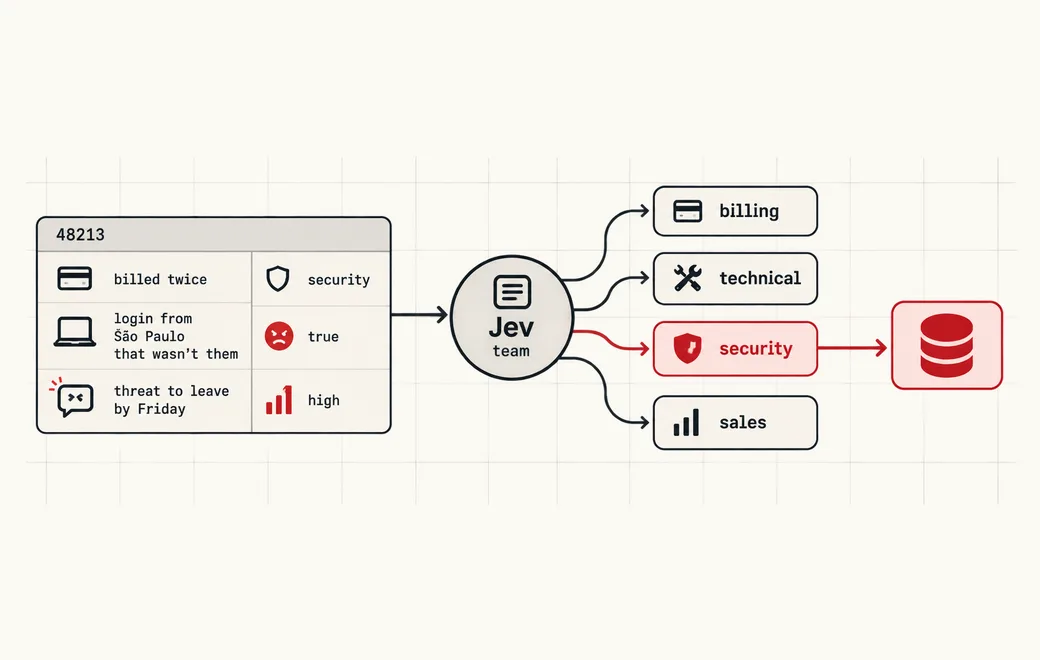
Who / when
Audience
- data and analytics engineers who query support tickets, reviews or notes in DuckDB, Postgres or a warehouse
- support ops teams who want triage columns (team, urgency, sentiment) without a labeling project
- builders adding natural-language filters to an internal tool or dashboard
Triggers
- a query needs a condition that lives in free text, like "angry customers" or "security-related tickets"
- keyword LIKE filters miss sarcasm, polite threats to churn, or tickets written in another language
- you want to GROUP BY or ORDER BY a meaning-level property such as urgency or product tier
- calling a chat model per row returns prose that breaks the column type
The workflow
- 01Row textTicket body + metadataInput
- 02Route to teambilling / technical / security / salesJev
- 03Angry + urgencyNoul filter, Score rankJev
- 04SQL columnsWHERE, ENUM, ORDER BYYour code
Question shape
{
  "team": {
    "type": "choice",
    "instructions": "Which team should own this support ticket? Pick the single best queue based on what the customer actually needs.",
    "criteria": {
      "billing": "Charges, invoices, refunds, plan changes, payment failures",
      "technical": "Bugs, errors, outages, integrations, how-to questions about the product",
      "security": "Account takeover, suspicious access, leaked credentials, data exposure or vulnerability reports",
      "sales": "New purchases, upgrades, quotes, pricing questions from prospects or expanding customers"
    }
  },
  "is_angry": {
    "type": "noul",
    "instructions": "The customer is angry or seriously frustrated, including polite but clear threats to cancel or escalate."
  },
  "urgency": {
    "type": "score",
    "instructions": "How urgent is this ticket for the business, considering customer impact, money at risk and security exposure.",
    "criteria": [
      "low",
      "medium",
      "high"
    ]
  }
}
Gate policy
≥ 0.90
Write the answer straight into the column: team as an ENUM, is_angry as a BOOLEAN predicate, urgency as a sortable value.
0.65–0.90
Store the value plus its probability column so queries can filter on confidence (e.g. WHERE is_angry_p > 0.8).
< 0.65
Store NULL with the probabilities and send the row to a review queue instead of guessing a category.
Failure modes
Pre-launch checks before you trust auto-routing:
- WHERE body ILIKE '%angry%' and missing every customer who is furious but polite;
- Letting a chat model invent new team names, so the ENUM cast fails or a fifth category appears;
- Storing only the top label and losing the probability you need to filter by confidence;
- Routing a ticket that mixes billing and account takeover to billing because it was mentioned first;
- Re-asking the model on every query instead of materializing the answers once as columns;
FAQ
How do Jev answers map to SQL types?
A Noul (yes/no) answer becomes a BOOLEAN predicate or a probability you can compare in WHERE. A Choice answer becomes an ENUM or a constrained text column. A Score answer becomes an ordered level you can ORDER BY. Keep the probabilities in companion columns so you can filter by confidence.
Do I call Jev inside every query?
Usually not. Run Jev once per new or changed row (as a batch job or a DuckDB UDF that calls the API) and write the typed answers into columns. Your dashboards then query those columns at normal SQL speed and cost.
Why not a keyword or sentiment model?
Keywords miss meaning and a generic sentiment score doesn't know your teams. With Jev you write the question and the allowed options in plain English for your own schema, and get calibrated probabilities over exactly those options.
Can I bring my own API key?
Yes. Try the free demo above without signing in. To run it live on your own text, sign in with Google and connect a Flatkey or OpenRouter key (a quick test call runs when you save it). Manage or delete it anytime under Dashboard → BYOK. Keys are stored encrypted on the server, used only for runs you trigger, and never sent back to the browser. Need a Flatkey key? Get one for Jev 1.13 on Flatkey.
Is this the official TypeSafe Jev product page?
No. jev-llm.com is an independent research and practice site. Verify pricing, models and terms at the original TypeSafe sources.
Sources
Jev × DuckDB: natural-language filters for angry customers, ticket triage to billing/technical/security/sales, product luxury scores; map Noul/Choice/Score into SQL predicates / ENUMs / sortable values.
— @yibie View the post on X →
Wire this gate with your own key
Bring your own key through Flatkey / OpenRouter. Keep exact checks in code.