Try it
Copy the code ↓- Data source
- Decision schema
- Model inference
- Structured result
2 Decision schema 3 typed questions
departmentchoicebillingtechnicalsalesurgencyscorenormalelevatedurgentcriticalneeds_humannoulprobability 0–1
3 Model inference typesafe/jev-1.13
Waiting for a run.
4 Structured result
Raw JSON
Run the demo to see the JSON answers, the highlighted pick and the final action.
FLATKEY_API_KEY and run.curl -sS https://router.flatkey.ai/api/alpha/decisions \
-H "Authorization: Bearer $FLATKEY_API_KEY" \
-H "Content-Type: application/json" \
-d '{
"model": "typesafe/jev-1.13",
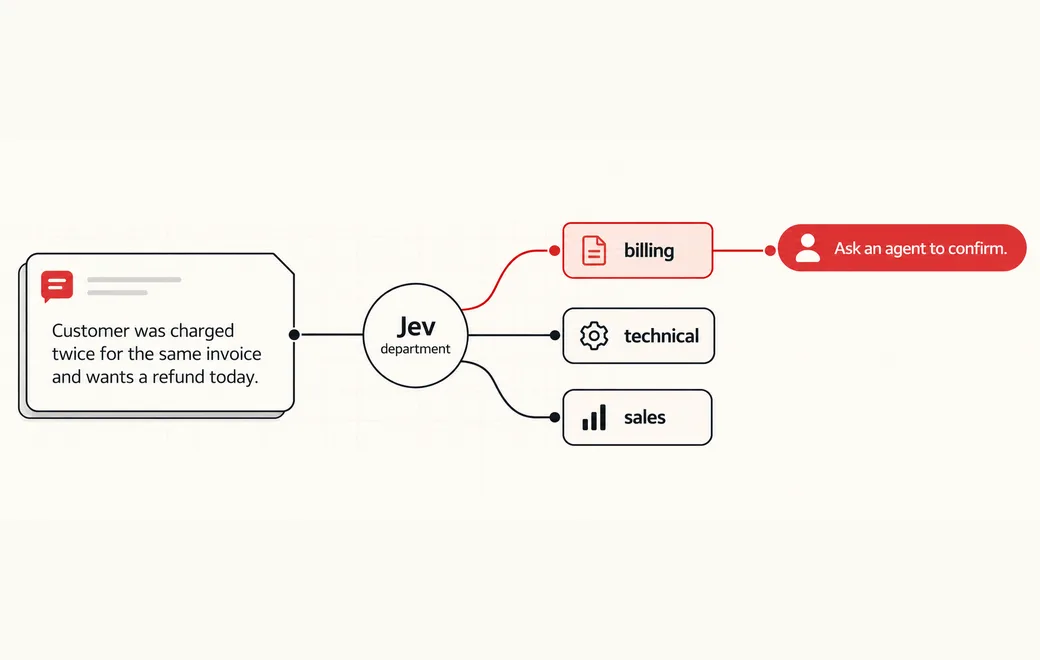
"state": "Customer was charged twice for the same invoice and wants a refund today.",
"questions": {
"department": {
"type": "choice",
"criteria": {
"billing": "Payments, invoices, refunds or subscriptions",
"technical": "Bugs, APIs or integrations",
"sales": "Plans, pricing or sales questions"
},
"instructions": "Pick the department that best fits the state."
},
"urgency": {
"type": "score",
"criteria": [
"normal",
"elevated",
"urgent",
"critical"
],
"instructions": "Rate the urgency of the state."
},
"needs_human": {
"type": "noul",
"instructions": "Is this true for the state: needs human?"
}
}
}'// Node.js 18+ (built-in fetch). Run: FLATKEY_API_KEY=... node jev.mjs
const body = {
"model": "typesafe/jev-1.13",
"state": "Customer was charged twice for the same invoice and wants a refund today.",
"questions": {
"department": {
"type": "choice",
"criteria": {
"billing": "Payments, invoices, refunds or subscriptions",
"technical": "Bugs, APIs or integrations",
"sales": "Plans, pricing or sales questions"
},
"instructions": "Pick the department that best fits the state."
},
"urgency": {
"type": "score",
"criteria": [
"normal",
"elevated",
"urgent",
"critical"
],
"instructions": "Rate the urgency of the state."
},
"needs_human": {
"type": "noul",
"instructions": "Is this true for the state: needs human?"
}
}
};
const res = await fetch("https://router.flatkey.ai/api/alpha/decisions", {
method: "POST",
headers: {
Authorization: `Bearer ${process.env.FLATKEY_API_KEY}`,
"Content-Type": "application/json",
},
body: JSON.stringify(body),
});
if (!res.ok) throw new Error(`Jev request failed: ${res.status} ${await res.text()}`);
const { answers, usage } = await res.json();
console.log(JSON.stringify(answers, null, 2), usage);# Python 3.8+ (pip install requests). Run: FLATKEY_API_KEY=... python jev.py
import json, os, requests
body = json.loads(r"""{
"model": "typesafe/jev-1.13",
"state": "Customer was charged twice for the same invoice and wants a refund today.",
"questions": {
"department": {
"type": "choice",
"criteria": {
"billing": "Payments, invoices, refunds or subscriptions",
"technical": "Bugs, APIs or integrations",
"sales": "Plans, pricing or sales questions"
},
"instructions": "Pick the department that best fits the state."
},
"urgency": {
"type": "score",
"criteria": [
"normal",
"elevated",
"urgent",
"critical"
],
"instructions": "Rate the urgency of the state."
},
"needs_human": {
"type": "noul",
"instructions": "Is this true for the state: needs human?"
}
}
}""")
res = requests.post(
"https://router.flatkey.ai/api/alpha/decisions",
headers={"Authorization": f"Bearer {os.environ['FLATKEY_API_KEY']}"},
json=body,
timeout=60,
)
res.raise_for_status()
data = res.json()
print(json.dumps(data["answers"], indent=2), data.get("usage"))No Flatkey key yet? Get one for Jev 1.13 →
About this use case
Who / when
Audience
- support ops leads who need consistent ownership rules
- platform engineers wiring decision gates into ticketing tools
- product teams replacing fragile prompt-and-parse routers
Triggers
- a new ticket lands in the shared inbox
- an escalation queue needs urgency triage
- agents disagree on department ownership
- you want auto-route only when confidence is high
The workflow
- 01Ticket stateMessage and contextInput
- 02Choicebilling / technical / salesJev
- 03ScoreUrgency levelJev
- 04Code gateRoute or escalateYour code
Question shape
{
  "department": {
    "type": "choice",
    "criteria": {
      "billing": "Payments, invoices, refunds or subscriptions",
      "technical": "Bugs, APIs or integrations",
      "sales": "Plans, pricing or sales questions"
    }
  },
  "urgency": {
    "type": "score",
    "criteria": [
      "normal",
      "elevated",
      "urgent",
      "critical"
    ]
  },
  "needs_human": {
    "type": "noul"
  }
}
Gate policy
≥ 0.90
Auto-route low-risk tickets.
0.65–0.90
Ask an agent to confirm.
< 0.65
Escalate to a human.
Failure modes
Pre-launch checks before you trust auto-routing:
- Refunds, duplicate charges and account-access edge cases;
- Colloquial language, typos and mixed-language text;
- Prompt injection, irrelevant history and contradictions;
- Stability when candidate order changes;
FAQ
Why not let a chat model write the routing decision as free text?
Free text still needs parsing, and confidence is hard to gate. Jev returns bounded answers and probabilities so your code can auto-route, confirm or escalate.
Can I bring my own API key?
Yes. Try the free demo above without signing in. To run it live on your own text, sign in with Google and connect a Flatkey or OpenRouter key (a quick test call runs when you save it). Manage or delete it anytime under Dashboard → BYOK. Keys are stored encrypted on the server, used only for runs you trigger, and never sent back to the browser. Need a Flatkey key? Get one for Jev 1.13 on Flatkey.
When should a ticket escalate to a human?
When confidence falls below your low band (here < 0.65), or when deterministic checks fail—refunds, account access, legal language and conflicting history.
Is this the official TypeSafe Jev product page?
No. jev-llm.com is an independent research and practice site. Verify pricing, models and terms at the original TypeSafe sources.
Wire this gate with your own key
Bring your own key through Flatkey / OpenRouter. Keep exact checks in code.