Try it
Copy the code ↓- Data source
- Decision schema
- Model inference
- Structured result
2 Decision schema 3 typed questions
intentchoiceeventremindertodotimersplitconvertnotenonereadinessscorejust_startedpartialreadyevent_modechoicein_personvideo_callphone_callunspecified
3 Model inference typesafe/jev-1.13
Waiting for a run.
4 Structured result
Raw JSON
Run the demo to see the JSON answers, the highlighted pick and the final action.
FLATKEY_API_KEY and run.curl -sS https://router.flatkey.ai/api/alpha/decisions \
-H "Authorization: Bearer $FLATKEY_API_KEY" \
-H "Content-Type: application/json" \
-d '{
"model": "typesafe/jev-1.13",
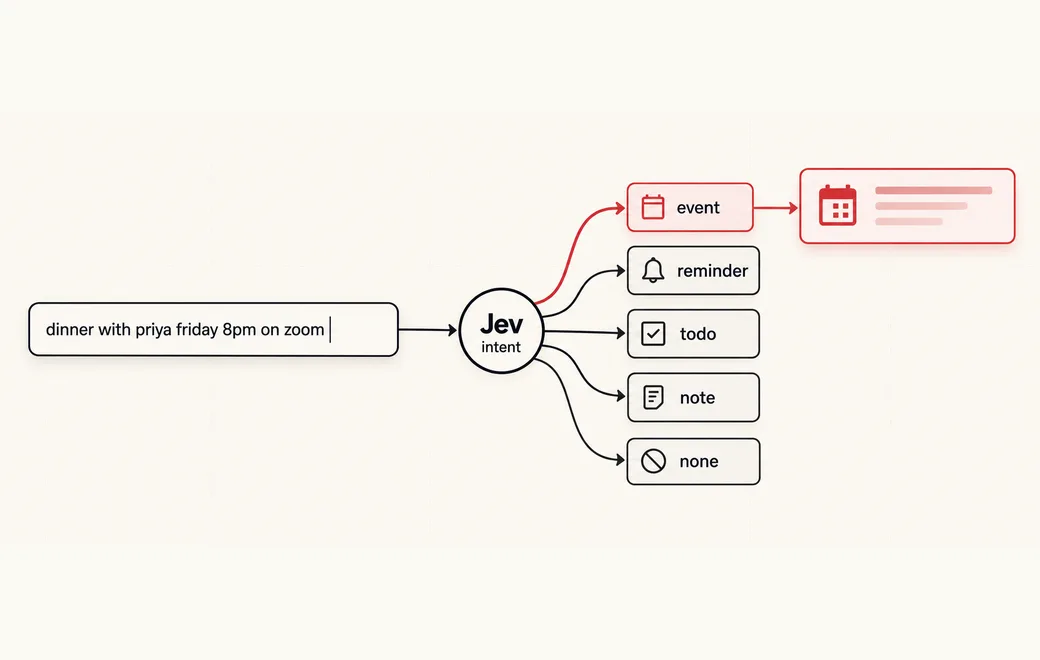
"state": "dinner with priya friday 8pm on zoom",
"questions": {
"intent": {
"type": "choice",
"instructions": "What is the person trying to create with this text?",
"criteria": {
"event": "Scheduling a meeting, meal, call or gathering at a time, usually with other people",
"reminder": "Asking to be reminded to do a single task themselves",
"todo": "Listing several separate things to do or buy",
"timer": "Starting a timer, countdown or focus session for a duration",
"split": "Dividing an amount of money between several people",
"convert": "Converting a value from one unit to another",
"note": "A thought, idea or note that is none of the above",
"none": "Too short, unclear or unfinished to tell yet"
}
},
"readiness": {
"type": "score",
"instructions": "How complete is this input for what the person is creating?",
"criteria": [
"just_started",
"partial",
"ready"
]
},
"event_mode": {
"type": "choice",
"instructions": "How would the gathering or meeting take place?",
"criteria": {
"in_person": "Meeting physically at a place",
"video_call": "A video call such as Zoom, Meet or FaceTime",
"phone_call": "A phone call",
"unspecified": "Not mentioned or not a meeting"
}
}
}
}'// Node.js 18+ (built-in fetch). Run: FLATKEY_API_KEY=... node jev.mjs
const body = {
"model": "typesafe/jev-1.13",
"state": "dinner with priya friday 8pm on zoom",
"questions": {
"intent": {
"type": "choice",
"instructions": "What is the person trying to create with this text?",
"criteria": {
"event": "Scheduling a meeting, meal, call or gathering at a time, usually with other people",
"reminder": "Asking to be reminded to do a single task themselves",
"todo": "Listing several separate things to do or buy",
"timer": "Starting a timer, countdown or focus session for a duration",
"split": "Dividing an amount of money between several people",
"convert": "Converting a value from one unit to another",
"note": "A thought, idea or note that is none of the above",
"none": "Too short, unclear or unfinished to tell yet"
}
},
"readiness": {
"type": "score",
"instructions": "How complete is this input for what the person is creating?",
"criteria": [
"just_started",
"partial",
"ready"
]
},
"event_mode": {
"type": "choice",
"instructions": "How would the gathering or meeting take place?",
"criteria": {
"in_person": "Meeting physically at a place",
"video_call": "A video call such as Zoom, Meet or FaceTime",
"phone_call": "A phone call",
"unspecified": "Not mentioned or not a meeting"
}
}
}
};
const res = await fetch("https://router.flatkey.ai/api/alpha/decisions", {
method: "POST",
headers: {
Authorization: `Bearer ${process.env.FLATKEY_API_KEY}`,
"Content-Type": "application/json",
},
body: JSON.stringify(body),
});
if (!res.ok) throw new Error(`Jev request failed: ${res.status} ${await res.text()}`);
const { answers, usage } = await res.json();
console.log(JSON.stringify(answers, null, 2), usage);# Python 3.8+ (pip install requests). Run: FLATKEY_API_KEY=... python jev.py
import json, os, requests
body = json.loads(r"""{
"model": "typesafe/jev-1.13",
"state": "dinner with priya friday 8pm on zoom",
"questions": {
"intent": {
"type": "choice",
"instructions": "What is the person trying to create with this text?",
"criteria": {
"event": "Scheduling a meeting, meal, call or gathering at a time, usually with other people",
"reminder": "Asking to be reminded to do a single task themselves",
"todo": "Listing several separate things to do or buy",
"timer": "Starting a timer, countdown or focus session for a duration",
"split": "Dividing an amount of money between several people",
"convert": "Converting a value from one unit to another",
"note": "A thought, idea or note that is none of the above",
"none": "Too short, unclear or unfinished to tell yet"
}
},
"readiness": {
"type": "score",
"instructions": "How complete is this input for what the person is creating?",
"criteria": [
"just_started",
"partial",
"ready"
]
},
"event_mode": {
"type": "choice",
"instructions": "How would the gathering or meeting take place?",
"criteria": {
"in_person": "Meeting physically at a place",
"video_call": "A video call such as Zoom, Meet or FaceTime",
"phone_call": "A phone call",
"unspecified": "Not mentioned or not a meeting"
}
}
}
}""")
res = requests.post(
"https://router.flatkey.ai/api/alpha/decisions",
headers={"Authorization": f"Bearer {os.environ['FLATKEY_API_KEY']}"},
json=body,
timeout=60,
)
res.raise_for_status()
data = res.json()
print(json.dumps(data["answers"], indent=2), data.get("usage"))No Flatkey key yet? Get one for Jev 1.13 →
About this use case
Who / when
Audience
- product engineers building command bars, quick-add boxes and smart inputs
- design-engineers prototyping intent-driven or generative UI
- teams replacing "new event / new task" buttons with one input
Triggers
- users type free text into a quick-add box and you must pick the right form
- the same input could be an event, a reminder, a checklist or a note
- you want UI variants (video call badge, urgency) without a chat model filling fields
- keystroke-level latency rules out a generative model
The workflow
- 01Input stateDebounced text from the boxInput
- 02ChoiceWhich card: event, reminder, todo, timer…Jev
- 03Score + ChoiceReadiness and variant signalsJev
- 04UI gateMorph, preview or stay plain textYour code
Question shape
{
  "intent": {
    "type": "choice",
    "instructions": "What is the person trying to create with this text?",
    "criteria": {
      "event": "Scheduling a meeting, meal, call or gathering at a time, usually with other people",
      "reminder": "Asking to be reminded to do a single task themselves",
      "todo": "Listing several separate things to do or buy",
      "timer": "Starting a timer, countdown or focus session for a duration",
      "split": "Dividing an amount of money between several people",
      "convert": "Converting a value from one unit to another",
      "note": "A thought, idea or note that is none of the above",
      "none": "Too short, unclear or unfinished to tell yet"
    }
  },
  "readiness": {
    "type": "score",
    "instructions": "How complete is this input for what the person is creating?",
    "criteria": [
      "just_started",
      "partial",
      "ready"
    ]
  },
  "event_mode": {
    "type": "choice",
    "instructions": "How would the gathering or meeting take place?",
    "criteria": {
      "in_person": "Meeting physically at a place",
      "video_call": "A video call such as Zoom, Meet or FaceTime",
      "phone_call": "A phone call",
      "unspecified": "Not mentioned or not a meeting"
    }
  }
}
Gate policy
≥ 0.85
Morph the text box into the chosen card.
0.50–0.85
Show a faint preview or "did you mean" chips for the top two cards.
< 0.50
Stay a plain text box and keep listening.
Failure modes
Pre-launch checks before you trust auto-routing:
- Half-typed input flickering between cards (use hysteresis, not a single threshold);
- Inputs that fit two cards, such as "remind me about dinner friday";
- Values Jev should never produce: dates, amounts, counts or unit math;
- Slow or failed calls: always have an offline fallback with the same output shape;
- New card types added without a distinct, non-overlapping description;
FAQ
Is there a real app built this way?
Yes. Anish Gupta's open-source Shapeshift (linked below) is one text box with nineteen card types. One Jev call answers fourteen typed questions in parallel (which card, plus signals like video call or urgency) while deterministic TypeScript parses every value. Its rule: "Jev decides, code computes." This page's question shape is a trimmed version of its schema.
How do you stop the UI from flickering while someone types?
Put a small state machine between the answer and the screen. Shapeshift's write-up describes a challenger that must win twice in a row or reach 0.85 before replacing the current card, collapsing to plain text only below 0.3, and signal badges that switch on at 0.65 and off at 0.45.
Can it work without a network call?
Shapeshift ships an offline keyword classifier that returns the same output shape as Jev, used by default and as a fallback when the API is slow or unreachable. The Try it demo on this page is also a local simulation; Run live calls Jev.
Can I bring my own API key?
Yes. Try the free demo above without signing in. To run it live on your own text, sign in with Google and connect a Flatkey or OpenRouter key (a quick test call runs when you save it). Manage or delete it anytime under Dashboard → BYOK. Keys are stored encrypted on the server, used only for runs you trigger, and never sent back to the browser. Need a Flatkey key? Get one for Jev 1.13 on Flatkey.
Is this the official TypeSafe Jev product page?
No. jev-llm.com is an independent research and practice site. Verify pricing, models and terms at the original TypeSafe sources.
Sources
1. shapeshift(自适应 UI):一个文本框随你打字变形为合适的控件,由 Jev 判断这句话该给什么界面,而且能离线跑(540⭐)。
— @yibie View the post on X →
Wire this gate with your own key
Bring your own key through Flatkey / OpenRouter. Keep exact checks in code.