Try it
Copy the code ↓- Data source
- Decision schema
- Model inference
- Structured result
2 Decision schema 3 typed questions
skillchoiceslidesspreadsheetpdf_toolsweb_researchfrontend_designnoneside_effectsscoreread_onlywrites_localwrites_externalirreversibleambiguousnoulprobability 0–1
3 Model inference typesafe/jev-1.13
Waiting for a run.
4 Structured result
Raw JSON
Run the demo to see the JSON answers, the highlighted pick and the final action.
FLATKEY_API_KEY and run.curl -sS https://router.flatkey.ai/api/alpha/decisions \
-H "Authorization: Bearer $FLATKEY_API_KEY" \
-H "Content-Type: application/json" \
-d '{
"model": "typesafe/jev-1.13",
"state": "Turn the attached churn CSV into a two-slide summary for Monday'\''s board meeting: one chart of monthly churn by plan, one slide of takeaways.",
"questions": {
"skill": {
"type": "choice",
"instructions": "Which skill should the agent load for this request?",
"criteria": {
"slides": "Create or edit presentation decks and slides",
"spreadsheet": "Analyze, clean or chart tabular data and CSV or Excel files",
"pdf_tools": "Read, fill, split or merge PDF documents",
"web_research": "Search the web and summarize sources",
"frontend_design": "Design or build web pages and UI components",
"none": "No skill is needed; the agent can answer directly"
}
},
"side_effects": {
"type": "score",
"instructions": "What is the most consequential effect of acting on this request?",
"criteria": [
"read_only",
"writes_local",
"writes_external",
"irreversible"
]
},
"ambiguous": {
"type": "noul",
"instructions": "Two or more skills fit this request about equally well."
}
}
}'// Node.js 18+ (built-in fetch). Run: FLATKEY_API_KEY=... node jev.mjs
const body = {
"model": "typesafe/jev-1.13",
"state": "Turn the attached churn CSV into a two-slide summary for Monday's board meeting: one chart of monthly churn by plan, one slide of takeaways.",
"questions": {
"skill": {
"type": "choice",
"instructions": "Which skill should the agent load for this request?",
"criteria": {
"slides": "Create or edit presentation decks and slides",
"spreadsheet": "Analyze, clean or chart tabular data and CSV or Excel files",
"pdf_tools": "Read, fill, split or merge PDF documents",
"web_research": "Search the web and summarize sources",
"frontend_design": "Design or build web pages and UI components",
"none": "No skill is needed; the agent can answer directly"
}
},
"side_effects": {
"type": "score",
"instructions": "What is the most consequential effect of acting on this request?",
"criteria": [
"read_only",
"writes_local",
"writes_external",
"irreversible"
]
},
"ambiguous": {
"type": "noul",
"instructions": "Two or more skills fit this request about equally well."
}
}
};
const res = await fetch("https://router.flatkey.ai/api/alpha/decisions", {
method: "POST",
headers: {
Authorization: `Bearer ${process.env.FLATKEY_API_KEY}`,
"Content-Type": "application/json",
},
body: JSON.stringify(body),
});
if (!res.ok) throw new Error(`Jev request failed: ${res.status} ${await res.text()}`);
const { answers, usage } = await res.json();
console.log(JSON.stringify(answers, null, 2), usage);# Python 3.8+ (pip install requests). Run: FLATKEY_API_KEY=... python jev.py
import json, os, requests
body = json.loads(r"""{
"model": "typesafe/jev-1.13",
"state": "Turn the attached churn CSV into a two-slide summary for Monday's board meeting: one chart of monthly churn by plan, one slide of takeaways.",
"questions": {
"skill": {
"type": "choice",
"instructions": "Which skill should the agent load for this request?",
"criteria": {
"slides": "Create or edit presentation decks and slides",
"spreadsheet": "Analyze, clean or chart tabular data and CSV or Excel files",
"pdf_tools": "Read, fill, split or merge PDF documents",
"web_research": "Search the web and summarize sources",
"frontend_design": "Design or build web pages and UI components",
"none": "No skill is needed; the agent can answer directly"
}
},
"side_effects": {
"type": "score",
"instructions": "What is the most consequential effect of acting on this request?",
"criteria": [
"read_only",
"writes_local",
"writes_external",
"irreversible"
]
},
"ambiguous": {
"type": "noul",
"instructions": "Two or more skills fit this request about equally well."
}
}
}""")
res = requests.post(
"https://router.flatkey.ai/api/alpha/decisions",
headers={"Authorization": f"Bearer {os.environ['FLATKEY_API_KEY']}"},
json=body,
timeout=60,
)
res.raise_for_status()
data = res.json()
print(json.dumps(data["answers"], indent=2), data.get("usage"))No Flatkey key yet? Get one for Jev 1.13 →
About this use case
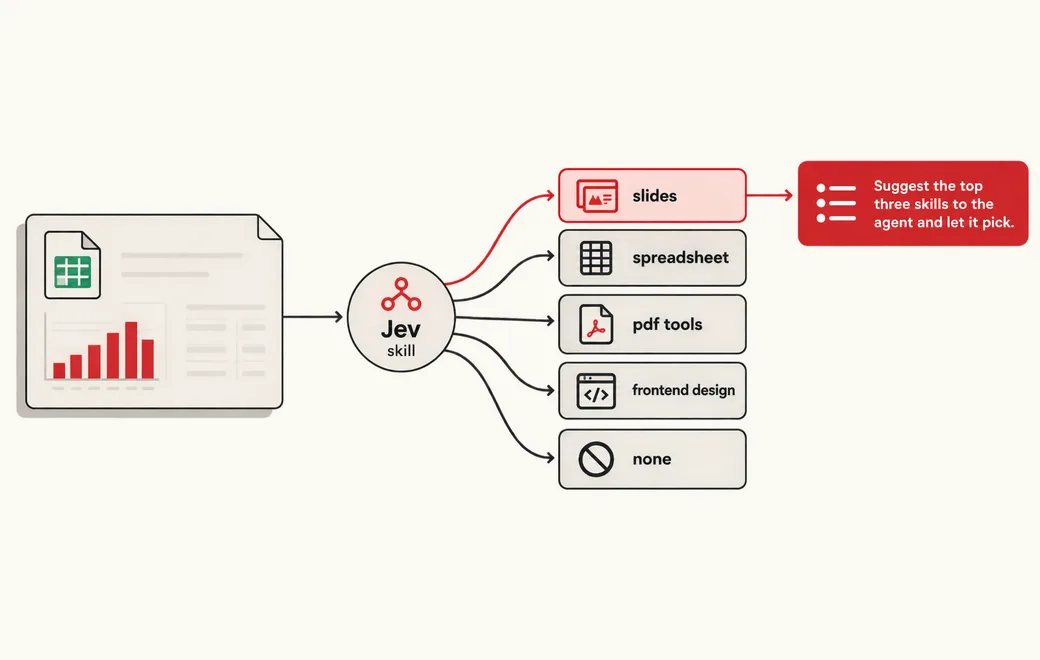
Who / when
Audience
- agent builders with dozens or hundreds of tools, skills or MCP servers
- coding-agent plugin authors routing tasks to skills
- platform teams that want tool choice auditable and cheap
Triggers
- the tool list no longer fits in the prompt without truncating descriptions
- the agent loads the wrong skill, or loads one when none was needed
- a request could go to two similar tools and you need a tie-break
- tool calls with side effects need a confirm step
The workflow
- 01Request stateUser request plus agent contextInput
- 02ChoiceOne skill from the catalog, or noneJev
- 03Score + NoulSide-effect level, two-way tie flagJev
- 04Code gateLoad, shortlist top 3 or skipYour code
Question shape
{
  "skill": {
    "type": "choice",
    "instructions": "Which skill should the agent load for this request?",
    "criteria": {
      "slides": "Create or edit presentation decks and slides",
      "spreadsheet": "Analyze, clean or chart tabular data and CSV or Excel files",
      "pdf_tools": "Read, fill, split or merge PDF documents",
      "web_research": "Search the web and summarize sources",
      "frontend_design": "Design or build web pages and UI components",
      "none": "No skill is needed; the agent can answer directly"
    }
  },
  "side_effects": {
    "type": "score",
    "instructions": "What is the most consequential effect of acting on this request?",
    "criteria": [
      "read_only",
      "writes_local",
      "writes_external",
      "irreversible"
    ]
  },
  "ambiguous": {
    "type": "noul",
    "instructions": "Two or more skills fit this request about equally well."
  }
}
Gate policy
≥ 0.90
Load the chosen skill automatically.
0.65–0.90
Suggest the top three skills to the agent and let it pick.
< 0.65
Load no skill; the agent asks or answers directly.
Failure modes
Pre-launch checks before you trust auto-routing:
- Requests that need two skills in sequence (analyze a CSV, then build slides);
- Near-duplicate skills whose descriptions overlap;
- "No skill needed" requests that still mention a file type or a tool name;
- Catalog changes: new skills added without distinct descriptions;
- Prompt injection in tool descriptions or retrieved content;
FAQ
Does a routing step actually reduce agent mistakes?
In TypeSafe's skill-selection cookbook, as written up by duqa (post below), Jev scored all 182 skills and whether one was needed, then suggested the best of the top three to the agent. On 488 requests with Claude Haiku 4.5 as the agent, wrong skills dropped from 16.8% to 7.3% and skills loaded when none was needed from 9.8% to 4.0%.
Is it fast enough to put in front of every request?
Edge reported Jev going 48/48 on routing skills with 100% hit@5, about 15× faster than their Sonnet ranker, and shipped it in Edge Pro (post below). Those are their numbers on their catalog; test on yours.
Why include a "none" option?
Because loading a skill that isn't needed is its own failure. A Choice with an explicit escape option lets Jev say "no tool" with a probability, instead of forcing a pick.
Can I bring my own API key?
Yes. Try the free demo above without signing in. To run it live on your own text, sign in with Google and connect a Flatkey or OpenRouter key (a quick test call runs when you save it). Manage or delete it anytime under Dashboard → BYOK. Keys are stored encrypted on the server, used only for runs you trigger, and never sent back to the browser. Need a Flatkey key? Get one for Jev 1.13 on Flatkey.
Is this the official TypeSafe Jev product page?
No. jev-llm.com is an independent research and practice site. Verify pricing, models and terms at the original TypeSafe sources.
Sources
Jev just went 48/48 routing skills. 100% hit@5. ~15x faster than our Sonnet ranker. So we put it in Edge Pro. First 100 get it free. break it.
— @fedepontehq View the post on X →
444x cheaper, says the launch. 12x, says my benchmark. Jev vs Claude on 1,507 intent decisions from customer support chats.
— @duqaXxX View the post on X →
Wire this gate with your own key
Bring your own key through Flatkey / OpenRouter. Keep exact checks in code.