Try it
Copy the code ↓- Data source
- Decision schema
- Model inference
- Structured result
2 Decision schema 3 typed questions
next_actionchoiceretryescalatecall_toolmark_safecontinueriskscorelowmediumhighcriticalneeds_humannoulprobability 0–1
3 Model inference typesafe/jev-1.13
Waiting for a run.
4 Structured result
Raw JSON
Run the demo to see the JSON answers, the highlighted pick and the final action.
FLATKEY_API_KEY and run.curl -sS https://router.flatkey.ai/api/alpha/decisions \
-H "Authorization: Bearer $FLATKEY_API_KEY" \
-H "Content-Type: application/json" \
-d '{
"model": "typesafe/jev-1.13",
"state": "Tool shell_exec failed twice with exit 127 (command not found). User is waiting in chat. Agent proposes: run `rm -rf /tmp/build && npm install` next. Retries so far: 2. Policy: no destructive filesystem commands without approval.",
"questions": {
"next_action": {
"type": "choice",
"criteria": {
"retry": "Same tool or step failed transiently and another attempt is warranted",
"escalate": "Human or higher-tier model should take over",
"call_tool": "A specific tool should run next under current policy",
"mark_safe": "The proposed action is safe to proceed without extra review",
"continue": "Keep the agent loop going with the current plan"
},
"instructions": "Pick the next action that best fits the state."
},
"risk": {
"type": "score",
"criteria": [
"low",
"medium",
"high",
"critical"
],
"instructions": "Rate the risk of the state."
},
"needs_human": {
"type": "noul",
"instructions": "Is this true for the state: needs human?"
}
}
}'// Node.js 18+ (built-in fetch). Run: FLATKEY_API_KEY=... node jev.mjs
const body = {
"model": "typesafe/jev-1.13",
"state": "Tool shell_exec failed twice with exit 127 (command not found). User is waiting in chat. Agent proposes: run `rm -rf /tmp/build && npm install` next. Retries so far: 2. Policy: no destructive filesystem commands without approval.",
"questions": {
"next_action": {
"type": "choice",
"criteria": {
"retry": "Same tool or step failed transiently and another attempt is warranted",
"escalate": "Human or higher-tier model should take over",
"call_tool": "A specific tool should run next under current policy",
"mark_safe": "The proposed action is safe to proceed without extra review",
"continue": "Keep the agent loop going with the current plan"
},
"instructions": "Pick the next action that best fits the state."
},
"risk": {
"type": "score",
"criteria": [
"low",
"medium",
"high",
"critical"
],
"instructions": "Rate the risk of the state."
},
"needs_human": {
"type": "noul",
"instructions": "Is this true for the state: needs human?"
}
}
};
const res = await fetch("https://router.flatkey.ai/api/alpha/decisions", {
method: "POST",
headers: {
Authorization: `Bearer ${process.env.FLATKEY_API_KEY}`,
"Content-Type": "application/json",
},
body: JSON.stringify(body),
});
if (!res.ok) throw new Error(`Jev request failed: ${res.status} ${await res.text()}`);
const { answers, usage } = await res.json();
console.log(JSON.stringify(answers, null, 2), usage);# Python 3.8+ (pip install requests). Run: FLATKEY_API_KEY=... python jev.py
import json, os, requests
body = json.loads(r"""{
"model": "typesafe/jev-1.13",
"state": "Tool shell_exec failed twice with exit 127 (command not found). User is waiting in chat. Agent proposes: run `rm -rf /tmp/build && npm install` next. Retries so far: 2. Policy: no destructive filesystem commands without approval.",
"questions": {
"next_action": {
"type": "choice",
"criteria": {
"retry": "Same tool or step failed transiently and another attempt is warranted",
"escalate": "Human or higher-tier model should take over",
"call_tool": "A specific tool should run next under current policy",
"mark_safe": "The proposed action is safe to proceed without extra review",
"continue": "Keep the agent loop going with the current plan"
},
"instructions": "Pick the next action that best fits the state."
},
"risk": {
"type": "score",
"criteria": [
"low",
"medium",
"high",
"critical"
],
"instructions": "Rate the risk of the state."
},
"needs_human": {
"type": "noul",
"instructions": "Is this true for the state: needs human?"
}
}
}""")
res = requests.post(
"https://router.flatkey.ai/api/alpha/decisions",
headers={"Authorization": f"Bearer {os.environ['FLATKEY_API_KEY']}"},
json=body,
timeout=60,
)
res.raise_for_status()
data = res.json()
print(json.dumps(data["answers"], indent=2), data.get("usage"))No Flatkey key yet? Get one for Jev 1.13 →
About this use case
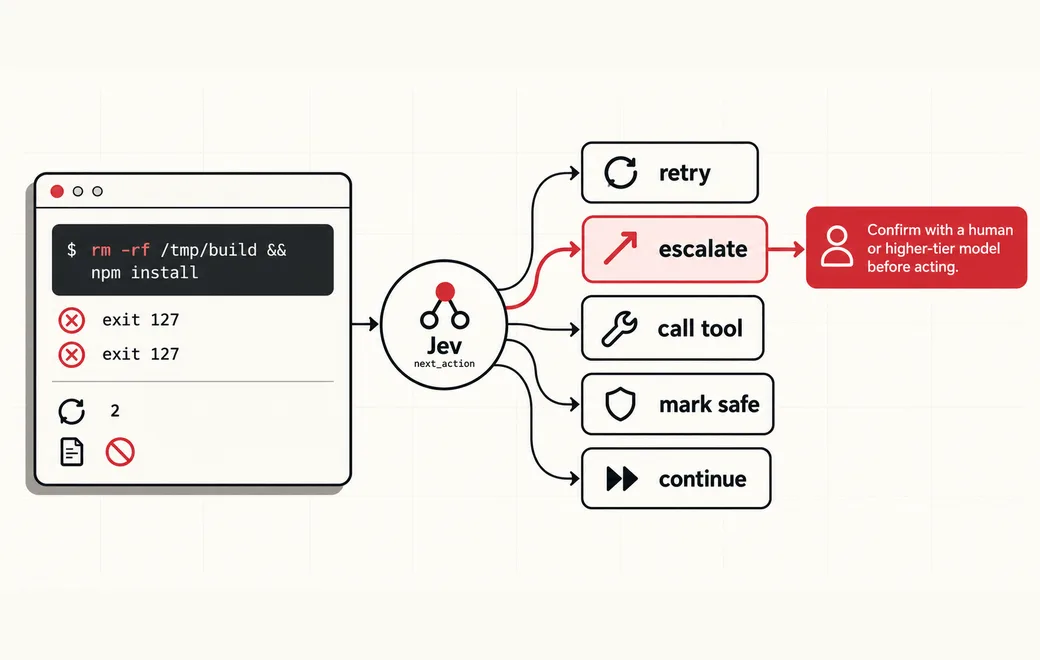
Who / when
Audience
- agent platform engineers who need reusable control gates
- teams replacing full LLM calls for every micro-decision
- builders wiring retry, escalate and tool-routing policies in code
Triggers
- a tool call fails and you need a retry-or-escalate call
- the agent must pick the next tool under policy constraints
- a proposed action needs a cheap safety check
- you want auto-continue only when confidence is high
The workflow
- 01Agent stateLoop context and proposalInput
- 02Choiceretry / escalate / call_tool / mark_safe / continueJev
- 03ScoreRisk bandJev
- 04Code gateApply, confirm or stopYour code
Question shape
{
  "next_action": {
    "type": "choice",
    "criteria": {
      "retry": "Same tool or step failed transiently and another attempt is warranted",
      "escalate": "Human or higher-tier model should take over",
      "call_tool": "A specific tool should run next under current policy",
      "mark_safe": "The proposed action is safe to proceed without extra review",
      "continue": "Keep the agent loop going with the current plan"
    }
  },
  "risk": {
    "type": "score",
    "criteria": [
      "low",
      "medium",
      "high",
      "critical"
    ]
  },
  "needs_human": {
    "type": "noul"
  }
}
Gate policy
≥ 0.90
Auto-apply the chosen next action when risk is low.
0.65–0.90
Confirm with a human or higher-tier model before acting.
< 0.65
Escalate or stop the agent loop.
Failure modes
Pre-launch checks before you trust auto-routing:
- Destructive shell, filesystem or credential-touching proposals;
- Ambiguous tool errors and missing exit-code context;
- Prompt injection in tool stdout, logs or retrieved documents;
- Stability when candidate order or retry counts change;
FAQ
Why not ask a full chat model at every agent step?
Most control steps are narrow: retry, escalate, pick a tool, check safety or continue. A typed System One layer returns bounded answers and probabilities so your code can auto-apply, confirm or stop without a full LLM call every time.
Can I bring my own API key?
Yes. Try the free demo above without signing in. To run it live on your own text, sign in with Google and connect a Flatkey or OpenRouter key (a quick test call runs when you save it). Manage or delete it anytime under Dashboard → BYOK. Keys are stored encrypted on the server, used only for runs you trigger, and never sent back to the browser. Need a Flatkey key? Get one for Jev 1.13 on Flatkey.
When should the agent escalate or stop?
When confidence falls below your low band (here < 0.65), when risk scores high or critical, or when deterministic checks fail—destructive commands, secrets, allowlist misses and exhausted retry budgets.
Is this the official TypeSafe Jev product page?
No. jev-llm.com is an independent research and practice site. Verify pricing, models and terms at the original TypeSafe sources.
Sources
AI doesn't always need an LLM. Sometimes you just need a model to answer: Should I retry? Should I escalate? Which tool should I call? Is this safe? Should this agent continue? That's why models like Jev are interesting.
— @im_pranavkakde View the post on X →
The bottleneck in agent loops just got exposed, and it is not model intelligence. Every time an agent decides which button to click, which search result to trust, or which tool call to make next, most stacks still route that micro decision through a full language model.
— @stretchcloud View the post on X →
Wire this gate with your own key
Bring your own key through Flatkey / OpenRouter. Keep exact checks in code.