An LLM router decides, for each incoming request, where it should go: a cheap model or a frontier model, a retrieval tool or a calculator, the billing handler or the bug-report flow. Routing is how teams cut cost without cutting quality, and how agents pick the right tool among dozens. This page covers why routing matters, the usual ways to build it, and how to build an LLM router from typed Jev decisions.
Why LLM routing matters
Most traffic in an AI product is not uniform. Some requests are trivial lookups, some need careful reasoning, some should not reach a model at all. Sending everything to the strongest model is simple and expensive; sending everything to the cheapest one is cheap and disappointing. The same is true for tools: an agent with many tools wastes tokens and makes mistakes when it has to consider all of them on every turn.
A router answers a small question many times: given this input, which path? Because it sits in front of every request, it has three hard requirements:
- It must be much cheaper and faster than the work it routes.
- Its output must be one of the known destinations, never a near-miss string.
- It must say how sure it is, so uncertain requests can take a safe default.
Common approaches and trade-offs
Keyword and rule routing. Regexes, prefixes and hand-written conditions. Transparent and instant, but brittle: users do not phrase requests the way rules expect, and each new route adds edge cases.
Embedding similarity. Embed the request, compare with example prompts for each route, pick the nearest. Cheap and language-flexible, but similarity is not intent. "Cancel my refund request" and "request a refund" sit close together and mean opposite things. Confidence is a distance, not a probability.
Prompted LLM classification. Ask a chat model to pick a route and reply in JSON. Accurate when it works, but you pay a full LLM call per request, must handle malformed or invented route names, and get no calibrated confidence.
Trained classifiers. Fast and accurate on a stable label set, but every new route or tool means new labels and retraining.
How Jev's typed decisions fit
Jev, from TypeSafe AI, takes state plus typed questions and returns typed answers. For routing that means:
- A Choice whose options are your destinations, each with a short description. Jev returns the chosen option, a probability for each option and a confidence value. Up to 255 options are supported.
- An optional Score on a 2–10 level ordered scale, such as difficulty or risk, to choose between a small and a large model.
- An optional Noul (a 0–1 probability) for a yes/no flag such as
needs_retrievalorout_of_scope.
Answers are always inside the schema, so there is no "unknown route" to handle. TypeSafe reports 70–500 ms per request, and Jev 1.13 on Flatkey is $0.042 per million input tokens with free output, which keeps the router a small line item next to the models it routes to.
Router architecture walkthrough
- Define destinations as data. Keep a table of routes: id, one-line description, target model or handler, minimum confidence. The Choice options are generated from it, so adding a route is a data change.
- Build compact state. Pass the user message and only the context that changes the answer: account tier, the current screen, the last turn. Routers degrade when they get the whole history.
- One request, several questions. Destination Choice, difficulty Score, and any flags, answered together.
- Route with a fallback. If confidence clears the route's threshold, dispatch. Otherwise send to a safe default: a stronger general model, a clarifying question, or a human queue.
- Log and replay. Store state, answers and the final outcome. Replaying logged traffic is the cheapest way to test a new route list before shipping it.
See model routing for small-vs-large model selection, LLM tool routing for picking tools in an agent, and intent extraction for turning a message into a typed intent.
Question types for a router
| Routing decision | Question type | Example |
|---|---|---|
| Destination model or handler | Choice | small_model, large_model, retrieval, human |
| Difficulty | Score | trivial → moderate → hard |
| Needs retrieval | Noul | probability from 0 to 1 |
Pitfalls and evaluation tips
- Overlapping routes. If two descriptions could both be right, the model will split probability between them. Merge them or sharpen the descriptions until a human can tell them apart.
- No "other" option. Always include a catch-all such as
unsupportedorneeds_clarification, or every odd request is forced into a real route. - Evaluate on outcome, not only label accuracy. A router that sends a hard question to the small model may still be "correct" by label and wrong by result. Track downstream success and cost per route.
- Recheck thresholds when you add routes. Probability is spread across options, so a new option changes the confidence distribution of the others.
When not to use Jev
If routing is determined by a field you already have (an explicit menu click, a header, a product id), use code. If you need the router to also write the answer, that is a generative model's job; let Jev pick the path and the generator produce the text. And if you have one route, you do not need a router.
Glossary
- Route / destination: a model, tool, template or handler a request can be sent to.
- Fallback: the default path taken when the router's confidence is below threshold.
- Cascade: trying a cheap model first and escalating to a stronger one only when needed.
- Cardinality: the number of options in a Choice question; up to 255 in Jev.
- Calibration: how well stated confidence matches observed accuracy.
The use cases below each ship a working router schema with a live demo and copyable code.
LLM Routing use cases
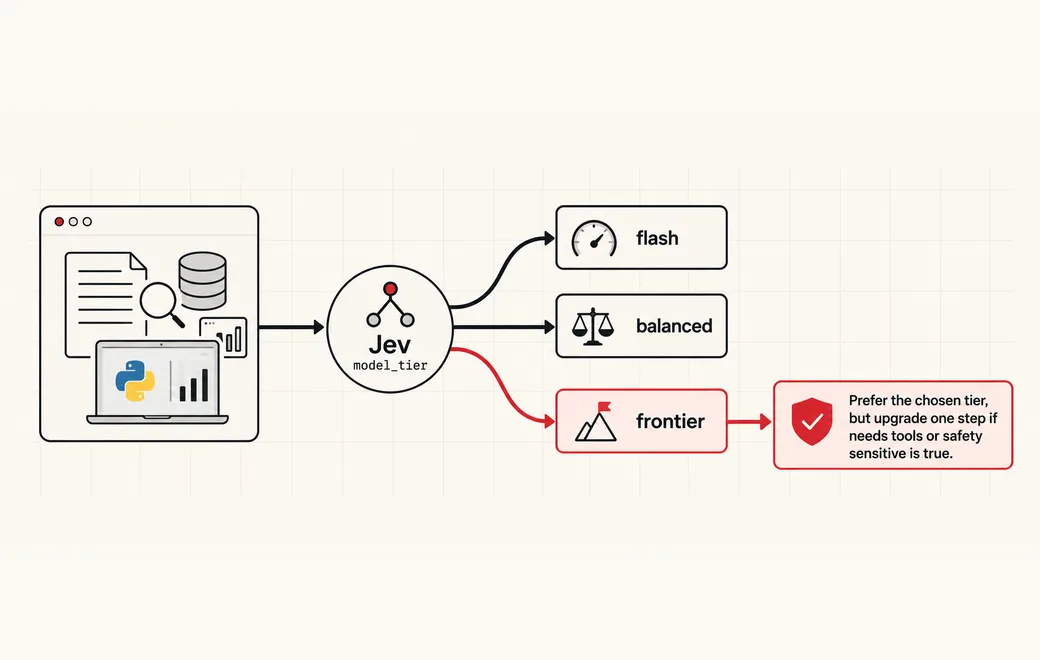 Routing
Route requests to the right model tier by clear criteria
Ultra-fast, criteria-based model routing with Jev: score complexity, reasoning need and risk, then send each request to flash, balanced or frontier before the expensive model runs.
See the workflow →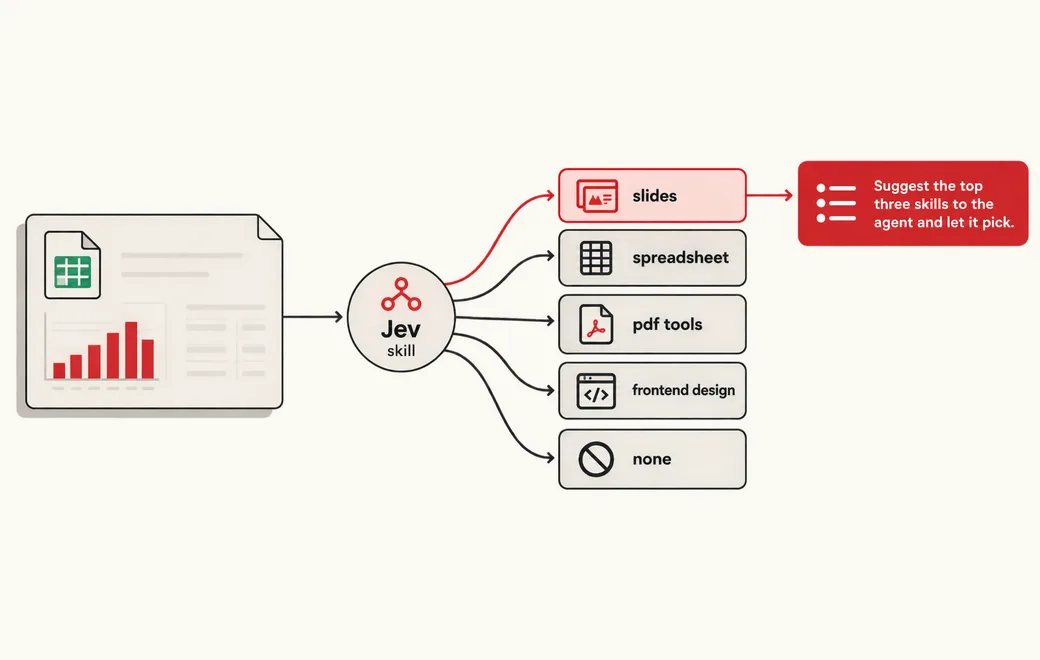 Agents
Route requests to the right tool or skill
Pick which tool or skill an agent should load, including "none", with one typed Choice over your catalog, then auto-load, shortlist or skip based on confidence.
See the workflow →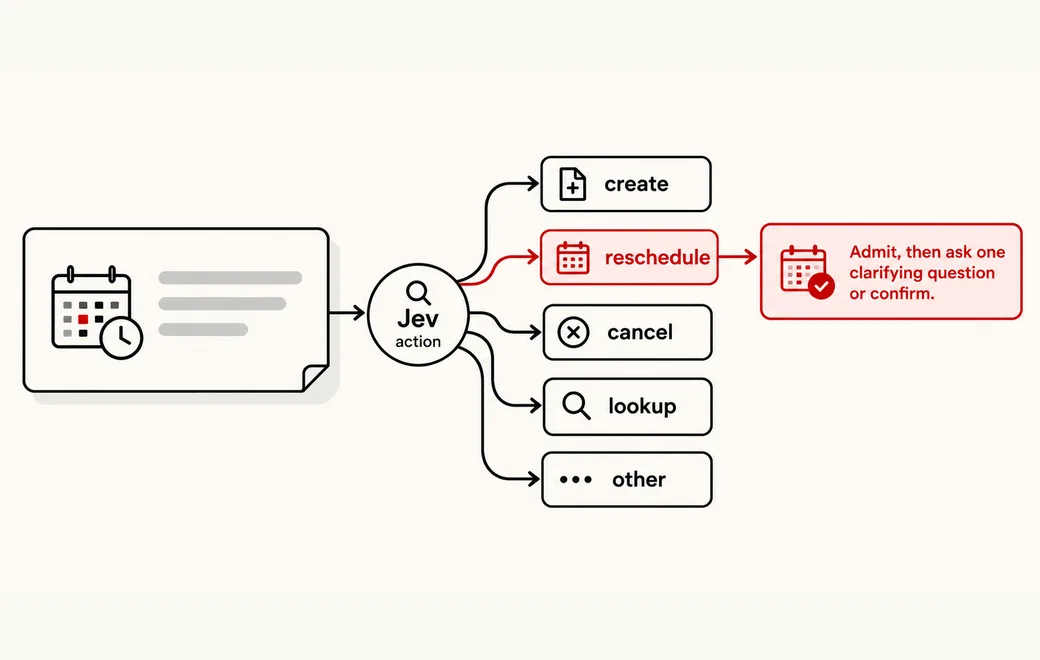 Routing
Extract typed intent fields at the edge
Turn a user request into four bounded intent fields in one Jev call, then validate, admit and schedule it in ordinary code instead of waiting on an LLM parser.
See the workflow →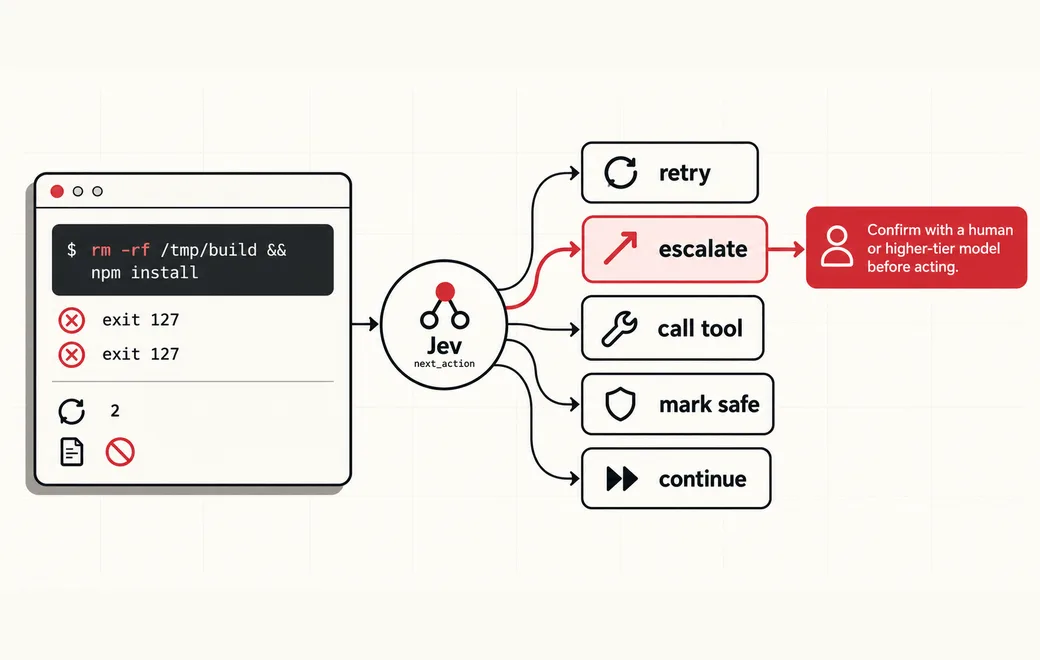 Workflow · also fits
Gate agent-control steps with cheap System One decisions
A Choice, Score and Noul workflow for retry, escalate, tool pick, safety and continue gates in agent loops.
See the workflow →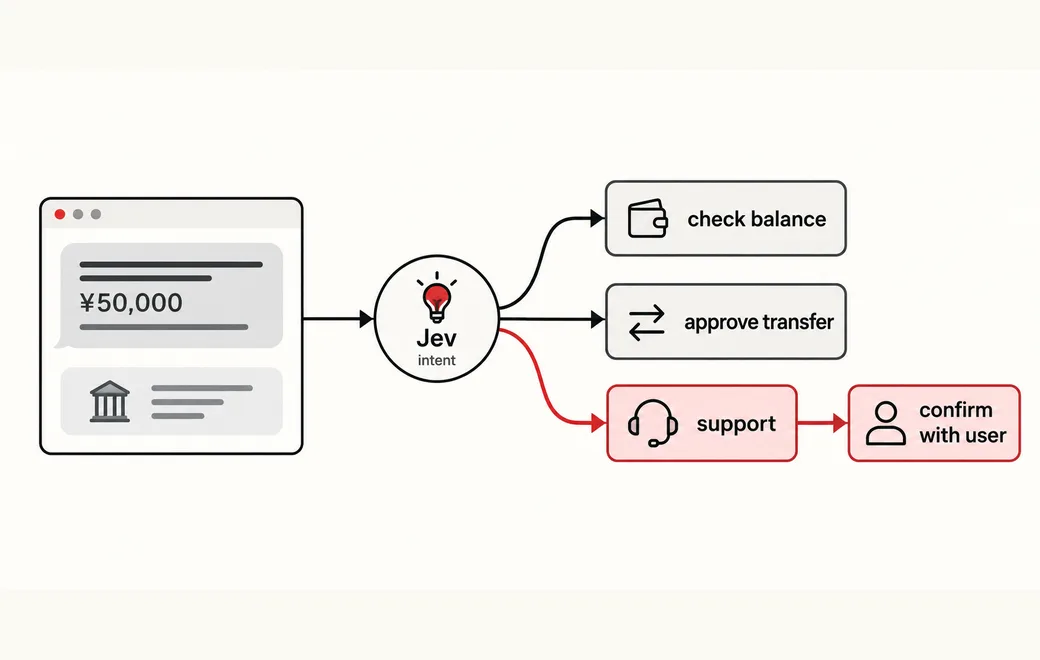 Agents / Confidence lamp · also fits
Route a typed intent Choice into auto-act, confirm-with-user, or escalate-to-human using Jev confidence and action severity
After a typed Choice (check balance, approve transfer, or support), read Jev confidence to auto-act, confirm with the user, or escalate to a human—thresholds track action severity, because confidence is not correctness.
See the workflow →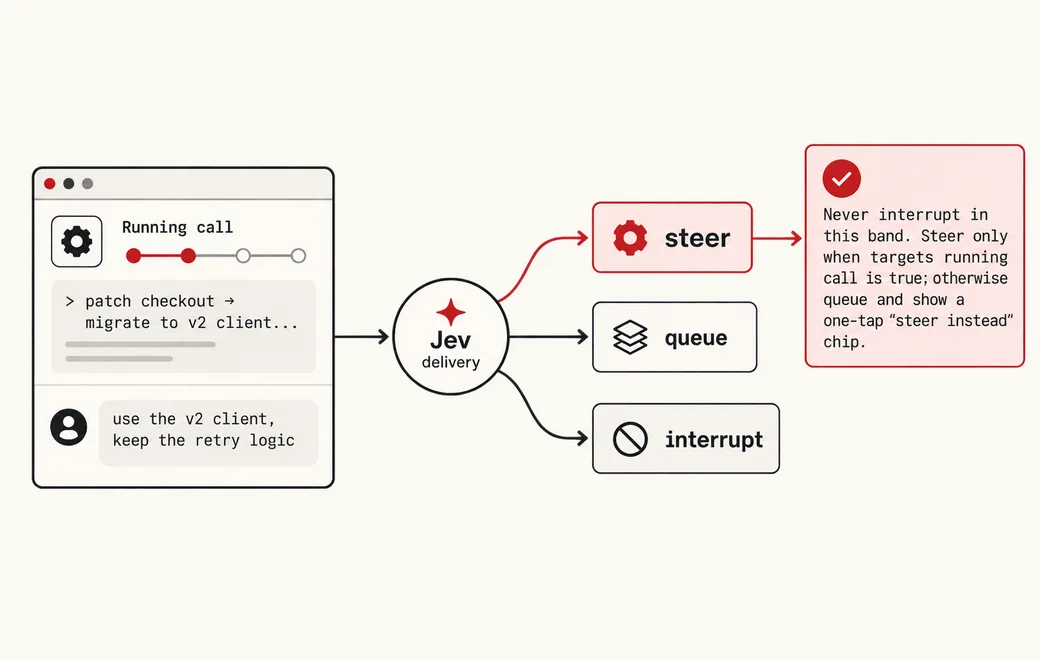 Agents / Steer or queue · also fits
Decide whether a new message should steer the running tool call or wait in the queue
A user types while an agent tool call is running. Ask Jev steer, queue, or interrupt—with a relevance score and a targets_running_call flag—so the harness routes the message without a chat-model round trip.
See the workflow →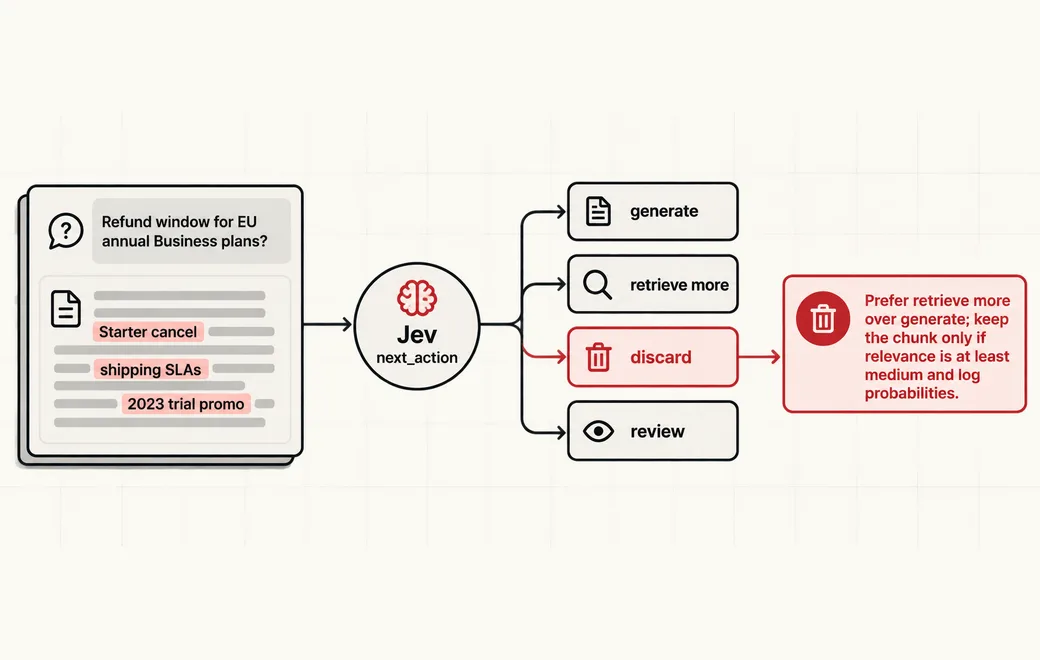 RAG / Evidence gates · also fits
Gate retrieved evidence before the generator runs
After retrieval and before generation, ask Jev whether each chunk is relevant, whether evidence is enough to answer, and whether to generate, retrieve more, discard, or review—so RAG pipelines stop feeding noise into the LLM.
See the workflow →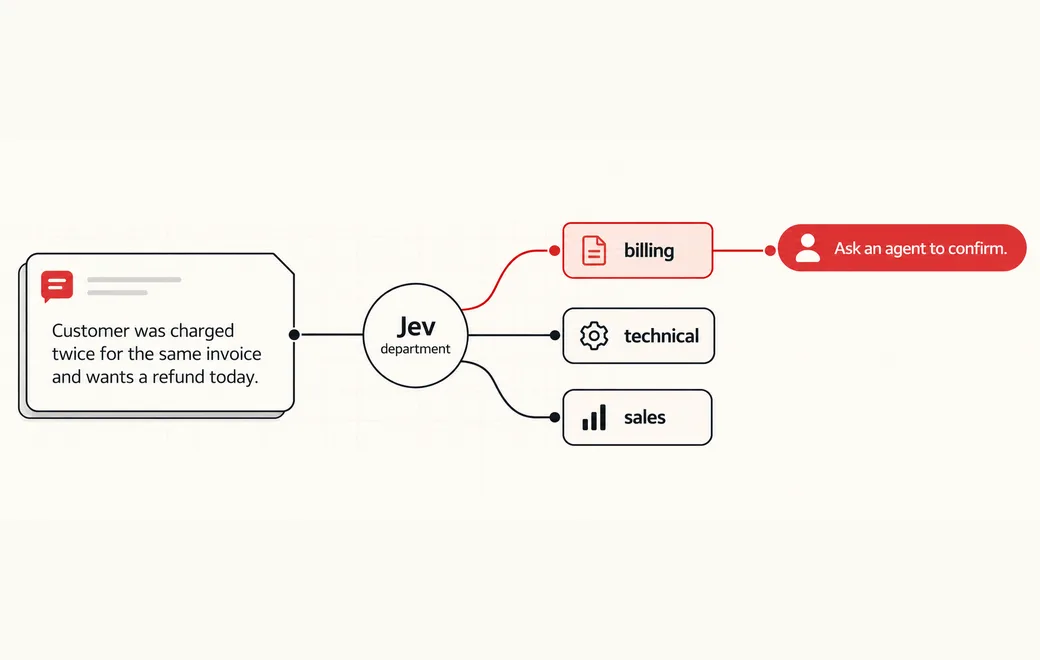 Workflow · also fits
Route support tickets by department and urgency
A Choice, Score and Noul workflow for ticket ownership, urgency and human review.
See the workflow →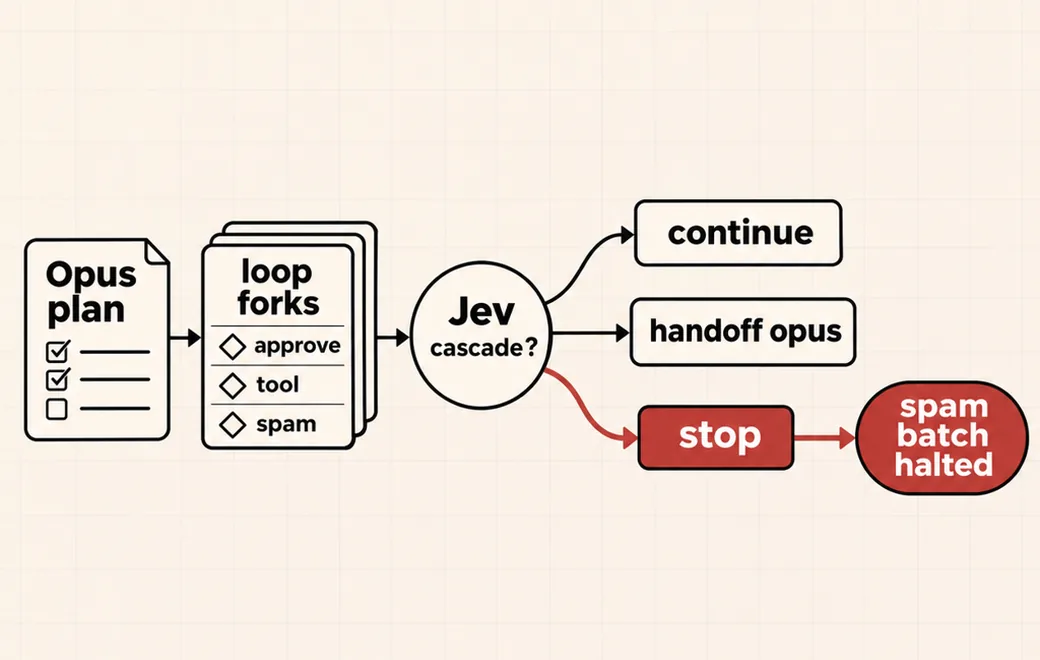 Agent cascade / Claude Code · also fits
Cascade Claude Code agents so Jev decides in-loop forks and Opus only takes the hard cases
Keep Opus on the plan. Let Jev answer every in-loop yes/no, tool pick, spam check and fork; hand only low-confidence or hard steps back to the frontier planner.
See the workflow →Copy the code
The request behind Use Jev for criteria-based model routing, calling Jev 1.13 on Flatkey. Set FLATKEY_API_KEY and run it as is, then swap in your own state and questions.
curl -sS https://router.flatkey.ai/api/alpha/decisions \
  -H "Authorization: Bearer $FLATKEY_API_KEY" \
  -H "Content-Type: application/json" \
  -d '{
  "model": "typesafe/jev-1.13",
  "state": "Research the three main approaches to RAG evaluation in 2025, cite peer-reviewed papers and recent industry blogs, then write a Python notebook that benchmarks faithfulness and context precision on our 200-question internal set. Flag any claim you cannot source.",
  "questions": {
    "model_tier": {
      "type": "choice",
      "instructions": "Which model tier should handle this request? Prefer the cheapest tier that can still do the job well.",
      "criteria": {
        "flash": "Short, low-stakes answers: lookups, rewrites, formatting, simple Q&A with little reasoning",
        "balanced": "Moderate work: light coding, short summarization, single-tool calls, everyday analysis",
        "frontier": "Hard work: multi-step reasoning, research with citations, complex code, safety-sensitive or irreversible actions"
      }
    },
    "complexity": {
      "type": "score",
      "instructions": "How much reasoning, planning or domain depth does this request need?",
      "criteria": [
        "low",
        "medium",
        "high"
      ]
    },
    "needs_tools": {
      "type": "noul",
      "instructions": "The request needs tool use, multi-step planning, or retrieval with citations to succeed."
    },
    "safety_sensitive": {
      "type": "noul",
      "instructions": "A wrong answer could cause real harm, irreversible change, or a high-stakes decision."
    }
  }
}'
// Node.js 18+ (built-in fetch). Run: FLATKEY_API_KEY=... node jev.mjs
const body = {
"model": "typesafe/jev-1.13",
"state": "Research the three main approaches to RAG evaluation in 2025, cite peer-reviewed papers and recent industry blogs, then write a Python notebook that benchmarks faithfulness and context precision on our 200-question internal set. Flag any claim you cannot source.",
"questions": {
"model_tier": {
"type": "choice",
"instructions": "Which model tier should handle this request? Prefer the cheapest tier that can still do the job well.",
"criteria": {
"flash": "Short, low-stakes answers: lookups, rewrites, formatting, simple Q&A with little reasoning",
"balanced": "Moderate work: light coding, short summarization, single-tool calls, everyday analysis",
"frontier": "Hard work: multi-step reasoning, research with citations, complex code, safety-sensitive or irreversible actions"
}
},
"complexity": {
"type": "score",
"instructions": "How much reasoning, planning or domain depth does this request need?",
"criteria": [
"low",
"medium",
"high"
]
},
"needs_tools": {
"type": "noul",
"instructions": "The request needs tool use, multi-step planning, or retrieval with citations to succeed."
},
"safety_sensitive": {
"type": "noul",
"instructions": "A wrong answer could cause real harm, irreversible change, or a high-stakes decision."
}
}
};
const res = await fetch("https://router.flatkey.ai/api/alpha/decisions", {
method: "POST",
headers: {
Authorization: `Bearer ${process.env.FLATKEY_API_KEY}`,
"Content-Type": "application/json",
},
body: JSON.stringify(body),
});
if (!res.ok) throw new Error(`Jev request failed: ${res.status} ${await res.text()}`);
const { answers, usage } = await res.json();
console.log(JSON.stringify(answers, null, 2), usage);# Python 3.8+ (pip install requests). Run: FLATKEY_API_KEY=... python jev.py
import json, os, requests
body = json.loads(r"""{
"model": "typesafe/jev-1.13",
"state": "Research the three main approaches to RAG evaluation in 2025, cite peer-reviewed papers and recent industry blogs, then write a Python notebook that benchmarks faithfulness and context precision on our 200-question internal set. Flag any claim you cannot source.",
"questions": {
"model_tier": {
"type": "choice",
"instructions": "Which model tier should handle this request? Prefer the cheapest tier that can still do the job well.",
"criteria": {
"flash": "Short, low-stakes answers: lookups, rewrites, formatting, simple Q&A with little reasoning",
"balanced": "Moderate work: light coding, short summarization, single-tool calls, everyday analysis",
"frontier": "Hard work: multi-step reasoning, research with citations, complex code, safety-sensitive or irreversible actions"
}
},
"complexity": {
"type": "score",
"instructions": "How much reasoning, planning or domain depth does this request need?",
"criteria": [
"low",
"medium",
"high"
]
},
"needs_tools": {
"type": "noul",
"instructions": "The request needs tool use, multi-step planning, or retrieval with citations to succeed."
},
"safety_sensitive": {
"type": "noul",
"instructions": "A wrong answer could cause real harm, irreversible change, or a high-stakes decision."
}
}
}""")
res = requests.post(
"https://router.flatkey.ai/api/alpha/decisions",
headers={"Authorization": f"Bearer {os.environ['FLATKEY_API_KEY']}"},
json=body,
timeout=60,
)
res.raise_for_status()
data = res.json()
print(json.dumps(data["answers"], indent=2), data.get("usage"))FAQ
What is an LLM router?
A component that looks at an incoming request and decides where it should go: which model, which tool, which prompt template or which downstream handler. The goal is to use expensive models only when they are needed and to send each request to the path most likely to succeed.
Is a big LLM a good router?
It can classify well, but it is slow and expensive for a step that runs on every request, and its output is free text you must parse. A router should cost a small fraction of the work it routes.
How does Jev act as a router?
You describe the destinations as options of a Choice question. Jev returns one option with a probability for every option and a confidence value, so your code can route directly and fall back to a default or a stronger model when confidence is low.
How many routes can one Jev Choice handle?
TypeSafe says Jev supports a cardinality of up to 255 options per Choice question. In practice keep the list to destinations a reviewer can tell apart from their descriptions.
Can I add a difficulty score to the routing decision?
Yes. Add a Score question such as task difficulty on a 2 to 10 level scale in the same request. Many routers combine the destination Choice with a difficulty Score to pick between a small and a large model.
Does Jev replace OpenRouter or Flatkey?
No. Those are API gateways that give you access to many models, including Jev. Jev is the model that makes the routing decision; the gateway carries the call.
Further reading
Other categories
 23 use casesAI Agent GuardrailsGate every agent action, memory write and retry with a cheap, typed allow / review / block decision.
 11 use casesLLM-as-a-Judge & EvalsScore agent runs, RAG answers and CI test evidence with low-variance typed verdicts.
 22 use casesClassification & TriageRoute tickets, issues, reports and applications by category, urgency and review need.
 11 use casesStructured Data ExtractionTurn free text into typed columns, matched entities, SQL filters and document splits.
 7 use casesSecurity & ComplianceGate invoice payments, validate pentest findings and lint for personal data before it ships.
 5 use casesGames & Adaptive UIFast typed decisions for game agents, RTS unit control and interfaces that adapt as users type.
Run llm routing on real Jev
Every use case above runs live with your own key. Get a Flatkey key for Jev 1.13, or bring an OpenRouter key under Dashboard → BYOK.