Try it
Copy the code ↓- Data source
- Decision schema
- Model inference
- Structured result
2 Decision schema 3 typed questions
lint_verdictchoicepasswarnfailneeds_reviewpii_severityscorenonelowhighredaction_presentnoulprobability 0–1
3 Model inference typesafe/jev-1.13
Waiting for a run.
4 Structured result
Raw JSON
Run the demo to see the JSON answers, the highlighted pick and the final action.
FLATKEY_API_KEY and run.curl -sS https://router.flatkey.ai/api/alpha/decisions \
-H "Authorization: Bearer $FLATKEY_API_KEY" \
-H "Content-Type: application/json" \
-d '{
"model": "typesafe/jev-1.13",
"state": "Rule: never write PII (emails, phone numbers, addresses, tokens) to logs.\nFile: src/api/signup.ts line 42 (added)\n+ logger.info(\"signup ok\", { user: req.body, plan: plan.id });\nContext: req.body = { email, phone, password, referralCode }; logger ships to Datadog; no redaction middleware on this route.\nTask: semantic lint verdict for this line — pass / warn / fail / needs_review (+ pii_severity, redaction_present).",
"questions": {
"lint_verdict": {
"type": "choice",
"instructions": "Apply the semantic lint rule to the changed code. Rule: changes must not write personally identifiable information (emails, phone numbers, addresses, names, government ids, auth tokens) to logs, analytics or error reports. Decide the lint result for this change.",
"criteria": {
"pass": "The change does not write PII anywhere; logged values are ids, counts, enums or already-redacted",
"warn": "Possible PII exposure that depends on runtime data or configuration; flag it but don'\''t fail the build",
"fail": "The change clearly writes PII (or an object that contains PII) to a log, analytics event or error report",
"needs_review": "Not enough context in the diff to judge; a human should look before merge"
}
},
"pii_severity": {
"type": "score",
"instructions": "How sensitive is the most sensitive personal data this change could expose in logs or telemetry.",
"criteria": [
"none",
"low",
"high"
]
},
"redaction_present": {
"type": "noul",
"instructions": "The change already masks, hashes or redacts every personal field before it is logged."
}
}
}'// Node.js 18+ (built-in fetch). Run: FLATKEY_API_KEY=... node jev.mjs
const body = {
"model": "typesafe/jev-1.13",
"state": "Rule: never write PII (emails, phone numbers, addresses, tokens) to logs.\nFile: src/api/signup.ts line 42 (added)\n+ logger.info(\"signup ok\", { user: req.body, plan: plan.id });\nContext: req.body = { email, phone, password, referralCode }; logger ships to Datadog; no redaction middleware on this route.\nTask: semantic lint verdict for this line — pass / warn / fail / needs_review (+ pii_severity, redaction_present).",
"questions": {
"lint_verdict": {
"type": "choice",
"instructions": "Apply the semantic lint rule to the changed code. Rule: changes must not write personally identifiable information (emails, phone numbers, addresses, names, government ids, auth tokens) to logs, analytics or error reports. Decide the lint result for this change.",
"criteria": {
"pass": "The change does not write PII anywhere; logged values are ids, counts, enums or already-redacted",
"warn": "Possible PII exposure that depends on runtime data or configuration; flag it but don't fail the build",
"fail": "The change clearly writes PII (or an object that contains PII) to a log, analytics event or error report",
"needs_review": "Not enough context in the diff to judge; a human should look before merge"
}
},
"pii_severity": {
"type": "score",
"instructions": "How sensitive is the most sensitive personal data this change could expose in logs or telemetry.",
"criteria": [
"none",
"low",
"high"
]
},
"redaction_present": {
"type": "noul",
"instructions": "The change already masks, hashes or redacts every personal field before it is logged."
}
}
};
const res = await fetch("https://router.flatkey.ai/api/alpha/decisions", {
method: "POST",
headers: {
Authorization: `Bearer ${process.env.FLATKEY_API_KEY}`,
"Content-Type": "application/json",
},
body: JSON.stringify(body),
});
if (!res.ok) throw new Error(`Jev request failed: ${res.status} ${await res.text()}`);
const { answers, usage } = await res.json();
console.log(JSON.stringify(answers, null, 2), usage);# Python 3.8+ (pip install requests). Run: FLATKEY_API_KEY=... python jev.py
import json, os, requests
body = json.loads(r"""{
"model": "typesafe/jev-1.13",
"state": "Rule: never write PII (emails, phone numbers, addresses, tokens) to logs.\nFile: src/api/signup.ts line 42 (added)\n+ logger.info(\"signup ok\", { user: req.body, plan: plan.id });\nContext: req.body = { email, phone, password, referralCode }; logger ships to Datadog; no redaction middleware on this route.\nTask: semantic lint verdict for this line — pass / warn / fail / needs_review (+ pii_severity, redaction_present).",
"questions": {
"lint_verdict": {
"type": "choice",
"instructions": "Apply the semantic lint rule to the changed code. Rule: changes must not write personally identifiable information (emails, phone numbers, addresses, names, government ids, auth tokens) to logs, analytics or error reports. Decide the lint result for this change.",
"criteria": {
"pass": "The change does not write PII anywhere; logged values are ids, counts, enums or already-redacted",
"warn": "Possible PII exposure that depends on runtime data or configuration; flag it but don't fail the build",
"fail": "The change clearly writes PII (or an object that contains PII) to a log, analytics event or error report",
"needs_review": "Not enough context in the diff to judge; a human should look before merge"
}
},
"pii_severity": {
"type": "score",
"instructions": "How sensitive is the most sensitive personal data this change could expose in logs or telemetry.",
"criteria": [
"none",
"low",
"high"
]
},
"redaction_present": {
"type": "noul",
"instructions": "The change already masks, hashes or redacts every personal field before it is logged."
}
}
}""")
res = requests.post(
"https://router.flatkey.ai/api/alpha/decisions",
headers={"Authorization": f"Bearer {os.environ['FLATKEY_API_KEY']}"},
json=body,
timeout=60,
)
res.raise_for_status()
data = res.json()
print(json.dumps(data["answers"], indent=2), data.get("usage"))No Flatkey key yet? Get one for Jev 1.13 →
About this use case
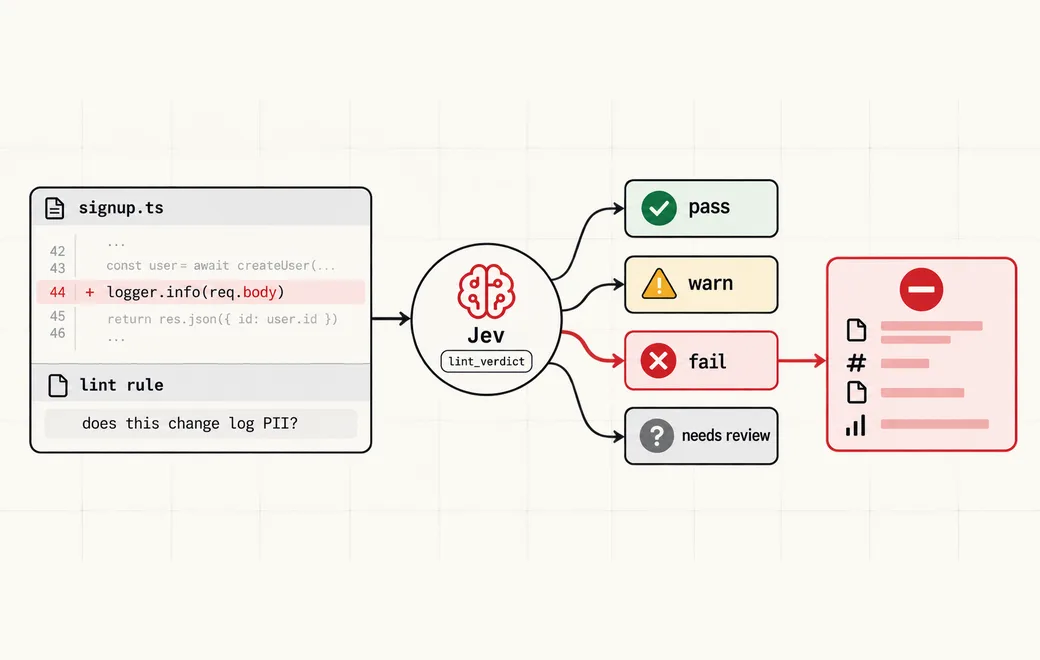
Who / when
Audience
- platform and DevEx teams who want meaning-level lint rules in CI next to ESLint
- teams letting coding agents open pull requests that touch logging, analytics or error reporting
- security and privacy engineers who own rules like "no PII in logs" but can't express them as regex
Triggers
- a diff adds or changes a log, print, analytics or error-reporting call
- a logged object may carry user fields (email, phone, address, tokens) even though no field name looks sensitive
- a coding agent's pull request touches request handlers, auth or payment code paths
- a regex or AST rule fires too often on safe identifiers, so the team has started ignoring it
The workflow
- 01Diff + ruleFile, line, English ruleInput
- 02Score PII severitynone / low / highJev
- 03Lint verdictpass / warn / fail / reviewJev
- 04CI gateReport file:line, fail or passYour code
Question shape
{
  "lint_verdict": {
    "type": "choice",
    "instructions": "Apply the semantic lint rule to the changed code. Rule: changes must not write personally identifiable information (emails, phone numbers, addresses, names, government ids, auth tokens) to logs, analytics or error reports. Decide the lint result for this change.",
    "criteria": {
      "pass": "The change does not write PII anywhere; logged values are ids, counts, enums or already-redacted",
      "warn": "Possible PII exposure that depends on runtime data or configuration; flag it but don't fail the build",
      "fail": "The change clearly writes PII (or an object that contains PII) to a log, analytics event or error report",
      "needs_review": "Not enough context in the diff to judge; a human should look before merge"
    }
  },
  "pii_severity": {
    "type": "score",
    "instructions": "How sensitive is the most sensitive personal data this change could expose in logs or telemetry.",
    "criteria": [
      "none",
      "low",
      "high"
    ]
  },
  "redaction_present": {
    "type": "noul",
    "instructions": "The change already masks, hashes or redacts every personal field before it is logged."
  }
}
Gate policy
≥ 0.90
pass lets the check go green; fail blocks the merge and reports file, line, rule and probability like a normal linter error.
0.65–0.90
Report as a warning annotation on the line and suggest a redaction helper; don't fail the build.
< 0.65
Mark needs_review and request a reviewer from the owning team; keep the probability in the report.
Failure modes
Pre-launch checks before you trust auto-routing:
- Grepping for field names like email or ssn and missing a whole req.body or user object being logged;
- Failing the build on every log line that contains the word "user", until the team disables the rule;
- Asking a chat model for a free-text review and parsing "looks fine" as a pass;
- Letting the coding agent that wrote the change also decide whether its own change leaks PII;
- One global threshold, so uncertain lines either block merges or silently pass;
FAQ
How is a Jev semantic lint different from an ESLint rule?
ESLint rules match syntax and AST patterns. A semantic rule is an English yes/no question about meaning, such as whether a change will leak PII in logs. Jev answers it with calibrated probabilities, so your CI can report file, line, rule and probability like a normal linter and only fail above a threshold.
Where does it run in CI?
After your normal linters. Take each changed hunk that touches logging, analytics or error reporting, send it with the rule text to Jev, and turn the typed answers into lint annotations. Pass and high-confidence fail are automatic; the middle band becomes warnings or reviewer requests.
Does it replace secret scanners or regex rules?
No. Keep secret scanners, known-pattern regexes and allow-listed redaction helpers. Jev covers the cases they miss, like logging a whole request body or user object whose fields aren't visible at the call site.
Can I bring my own API key?
Yes. Try the free demo above without signing in. To run it live on your own text, sign in with Google and connect a Flatkey or OpenRouter key (a quick test call runs when you save it). Manage or delete it anytime under Dashboard → BYOK. Keys are stored encrypted on the server, used only for runs you trigger, and never sent back to the browser. Need a Flatkey key? Get one for Jev 1.13 on Flatkey.
Is this the official TypeSafe Jev product page?
No. jev-llm.com is an independent research and practice site. Verify pricing, models and terms at the original TypeSafe sources.
Sources
ESLint catches syntax. It can't catch whether a change will leak PII in logs. JEVLINT writes semantic rules as English yes/no questions; TypeSafe Jev returns calibrated probabilities and reports by file/line/rule/probability like a normal linter—meaning-level rules for agent/CI.
— @MazuzAsaf View the post on X →
Wire this gate with your own key
Bring your own key through Flatkey / OpenRouter. Keep exact checks in code.