Try it
Copy the code ↓- Data source
- Decision schema
- Model inference
- Structured result
2 Decision schema 4 typed questions
model_tierchoiceflashbalancedfrontiercomplexityscorelowmediumhighneeds_toolsnoulprobability 0–1safety_sensitivenoulprobability 0–1
3 Model inference typesafe/jev-1.13
Waiting for a run.
4 Structured result
Raw JSON
Run the demo to see the JSON answers, the highlighted pick and the final action.
FLATKEY_API_KEY and run.curl -sS https://router.flatkey.ai/api/alpha/decisions \
-H "Authorization: Bearer $FLATKEY_API_KEY" \
-H "Content-Type: application/json" \
-d '{
"model": "typesafe/jev-1.13",
"state": "Research the three main approaches to RAG evaluation in 2025, cite peer-reviewed papers and recent industry blogs, then write a Python notebook that benchmarks faithfulness and context precision on our 200-question internal set. Flag any claim you cannot source.",
"questions": {
"model_tier": {
"type": "choice",
"instructions": "Which model tier should handle this request? Prefer the cheapest tier that can still do the job well.",
"criteria": {
"flash": "Short, low-stakes answers: lookups, rewrites, formatting, simple Q&A with little reasoning",
"balanced": "Moderate work: light coding, short summarization, single-tool calls, everyday analysis",
"frontier": "Hard work: multi-step reasoning, research with citations, complex code, safety-sensitive or irreversible actions"
}
},
"complexity": {
"type": "score",
"instructions": "How much reasoning, planning or domain depth does this request need?",
"criteria": [
"low",
"medium",
"high"
]
},
"needs_tools": {
"type": "noul",
"instructions": "The request needs tool use, multi-step planning, or retrieval with citations to succeed."
},
"safety_sensitive": {
"type": "noul",
"instructions": "A wrong answer could cause real harm, irreversible change, or a high-stakes decision."
}
}
}'// Node.js 18+ (built-in fetch). Run: FLATKEY_API_KEY=... node jev.mjs
const body = {
"model": "typesafe/jev-1.13",
"state": "Research the three main approaches to RAG evaluation in 2025, cite peer-reviewed papers and recent industry blogs, then write a Python notebook that benchmarks faithfulness and context precision on our 200-question internal set. Flag any claim you cannot source.",
"questions": {
"model_tier": {
"type": "choice",
"instructions": "Which model tier should handle this request? Prefer the cheapest tier that can still do the job well.",
"criteria": {
"flash": "Short, low-stakes answers: lookups, rewrites, formatting, simple Q&A with little reasoning",
"balanced": "Moderate work: light coding, short summarization, single-tool calls, everyday analysis",
"frontier": "Hard work: multi-step reasoning, research with citations, complex code, safety-sensitive or irreversible actions"
}
},
"complexity": {
"type": "score",
"instructions": "How much reasoning, planning or domain depth does this request need?",
"criteria": [
"low",
"medium",
"high"
]
},
"needs_tools": {
"type": "noul",
"instructions": "The request needs tool use, multi-step planning, or retrieval with citations to succeed."
},
"safety_sensitive": {
"type": "noul",
"instructions": "A wrong answer could cause real harm, irreversible change, or a high-stakes decision."
}
}
};
const res = await fetch("https://router.flatkey.ai/api/alpha/decisions", {
method: "POST",
headers: {
Authorization: `Bearer ${process.env.FLATKEY_API_KEY}`,
"Content-Type": "application/json",
},
body: JSON.stringify(body),
});
if (!res.ok) throw new Error(`Jev request failed: ${res.status} ${await res.text()}`);
const { answers, usage } = await res.json();
console.log(JSON.stringify(answers, null, 2), usage);# Python 3.8+ (pip install requests). Run: FLATKEY_API_KEY=... python jev.py
import json, os, requests
body = json.loads(r"""{
"model": "typesafe/jev-1.13",
"state": "Research the three main approaches to RAG evaluation in 2025, cite peer-reviewed papers and recent industry blogs, then write a Python notebook that benchmarks faithfulness and context precision on our 200-question internal set. Flag any claim you cannot source.",
"questions": {
"model_tier": {
"type": "choice",
"instructions": "Which model tier should handle this request? Prefer the cheapest tier that can still do the job well.",
"criteria": {
"flash": "Short, low-stakes answers: lookups, rewrites, formatting, simple Q&A with little reasoning",
"balanced": "Moderate work: light coding, short summarization, single-tool calls, everyday analysis",
"frontier": "Hard work: multi-step reasoning, research with citations, complex code, safety-sensitive or irreversible actions"
}
},
"complexity": {
"type": "score",
"instructions": "How much reasoning, planning or domain depth does this request need?",
"criteria": [
"low",
"medium",
"high"
]
},
"needs_tools": {
"type": "noul",
"instructions": "The request needs tool use, multi-step planning, or retrieval with citations to succeed."
},
"safety_sensitive": {
"type": "noul",
"instructions": "A wrong answer could cause real harm, irreversible change, or a high-stakes decision."
}
}
}""")
res = requests.post(
"https://router.flatkey.ai/api/alpha/decisions",
headers={"Authorization": f"Bearer {os.environ['FLATKEY_API_KEY']}"},
json=body,
timeout=60,
)
res.raise_for_status()
data = res.json()
print(json.dumps(data["answers"], indent=2), data.get("usage"))No Flatkey key yet? Get one for Jev 1.13 →
About this use case
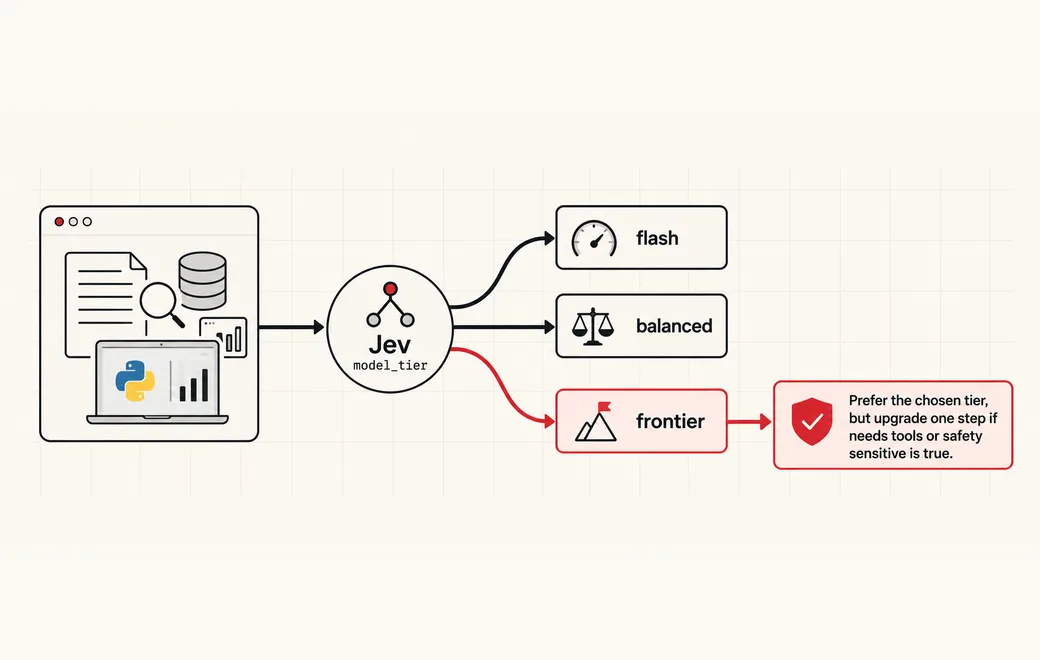
Who / when
Audience
- platform teams running multi-model gateways who want cost and latency under control
- agent builders who mix a cheap flash model with a frontier model on hard tasks
- product engineers replacing prompt-and-parse routers with typed decisions
Triggers
- every request hits the frontier model and the bill or p95 latency spikes
- a cheap model fails on multi-step reasoning, tool use or citation-heavy work
- you need an auditable reason a request went to flash vs frontier
- safety-sensitive or irreversible tasks must never skip the strong model
The workflow
- 01Request stateUser prompt + task contextInput
- 02Pick model tierflash / balanced / frontierJev
- 03Complexity + flagsScore + tools / multi-stepJev
- 04Code gateDispatch or force-upgradeYour code
Question shape
{
  "model_tier": {
    "type": "choice",
    "instructions": "Which model tier should handle this request? Prefer the cheapest tier that can still do the job well.",
    "criteria": {
      "flash": "Short, low-stakes answers: lookups, rewrites, formatting, simple Q&A with little reasoning",
      "balanced": "Moderate work: light coding, short summarization, single-tool calls, everyday analysis",
      "frontier": "Hard work: multi-step reasoning, research with citations, complex code, safety-sensitive or irreversible actions"
    }
  },
  "complexity": {
    "type": "score",
    "instructions": "How much reasoning, planning or domain depth does this request need?",
    "criteria": [
      "low",
      "medium",
      "high"
    ]
  },
  "needs_tools": {
    "type": "noul",
    "instructions": "The request needs tool use, multi-step planning, or retrieval with citations to succeed."
  },
  "safety_sensitive": {
    "type": "noul",
    "instructions": "A wrong answer could cause real harm, irreversible change, or a high-stakes decision."
  }
}
Gate policy
≥ 0.90
Dispatch straight to the chosen tier (flash, balanced or frontier).
0.65–0.90
Prefer the chosen tier, but upgrade one step if needs_tools or safety_sensitive is true.
< 0.65
Default to balanced, or force frontier when safety_sensitive is true; log the probabilities.
Failure modes
Pre-launch checks before you trust auto-routing:
- Routing every request to frontier "just in case" and erasing the cost/latency win;
- Sending multi-step research or citation work to flash because the prompt looked short;
- Ignoring safety_sensitive and letting a weak model approve irreversible actions;
- Overfitting the criteria to one product's prompts so new traffic misroutes;
- Prompt injection that tries to force "use the frontier model" without matching the criteria;
FAQ
Why not always call the strongest model?
Most traffic is short and low-stakes. Scoring complexity, tool need and risk once with Jev lets flash handle the easy majority and reserves frontier for the cases that actually need it—without a brittle prompt-and-parse router.
How is this different from LLM tool routing?
Tool routing picks which skill or API to load. Model routing picks which model tier runs the request. Many stacks need both: route the model first, then route tools inside that call. See LLM tool routing.
What does the Flatkey call look like?
POST https://router.flatkey.ai/api/alpha/decisions with Authorization: Bearer …, Content-Type: application/json, and a body of state, model (typesafe/jev-1.13), and questions (choice / score / noul). This is not an OpenAI-compatible /v1 chat endpoint.
Can I bring my own API key?
Yes. Try the free demo above without signing in. To run it live on your own text, sign in with Google and connect a Flatkey or OpenRouter key (a quick test call runs when you save it). Manage or delete it anytime under Dashboard → BYOK. Keys are stored encrypted on the server, used only for runs you trigger, and never sent back to the browser. Need a Flatkey key? Get one for Jev 1.13 on Flatkey.
Is this the official TypeSafe Jev product page?
No. jev-llm.com is an independent research and practice site. Verify pricing, models and terms at the original TypeSafe sources.
Sources
Ultra-fast, criteria-based model routing using Jev from @typesafeai.
— @eve View the post on X →
Wire this gate with your own key
Bring your own key through Flatkey / OpenRouter. Keep exact checks in code.