Try it
Copy the code ↓- Data source
- Decision schema
- Model inference
- Structured result
2 Decision schema 3 typed questions
deliverychoicesteerqueueinterruptrelevancescorelowmediumhightargets_running_callnoulprobability 0–1
3 Model inference typesafe/jev-1.13
Waiting for a run.
4 Structured result
Raw JSON
Run the demo to see the JSON answers, the highlighted pick and the final action.
FLATKEY_API_KEY and run.curl -sS https://router.flatkey.ai/api/alpha/decisions \
-H "Authorization: Bearer $FLATKEY_API_KEY" \
-H "Content-Type: application/json" \
-d '{
"model": "typesafe/jev-1.13",
"state": "Running tool call (2m 40s in):\n tool: apply_patch\n target: src/checkout/payment.ts\n goal: migrate checkout to the new payment client\n progress: 3 of 7 files patched\n\nNew user message:\n \"Wait—use the v2 client from packages/pay-v2, not the legacy one. Keep the retry logic you already added.\"\n\nTask: delivery (steer / queue / interrupt), relevance, targets_running_call.",
"questions": {
"delivery": {
"type": "choice",
"instructions": "A tool call is running and the user just sent a new message. How should the harness deliver it? Prefer steer when the message corrects or adds context to the step in flight; queue when it is a separate follow-up; interrupt only when the user clearly asks to stop or the running work is now wrong.",
"criteria": {
"steer": "The message corrects, narrows, or adds context to the running tool call; inject it at the next step and keep the work in flight",
"queue": "The message is a new or follow-up task that does not change the current step; deliver it after the run finishes",
"interrupt": "The user asks to stop, cancel, or restart, or the running call is now clearly wasted or harmful"
}
},
"relevance": {
"type": "score",
"instructions": "How strongly does the new message bear on the tool call that is running right now, based only on the running call and the message text provided.",
"criteria": [
"low",
"medium",
"high"
]
},
"targets_running_call": {
"type": "noul",
"instructions": "The message refers to the file, command, target, or goal of the running tool call—true only when there is a concrete link, not just the same project."
}
}
}'// Node.js 18+ (built-in fetch). Run: FLATKEY_API_KEY=... node jev.mjs
const body = {
"model": "typesafe/jev-1.13",
"state": "Running tool call (2m 40s in):\n tool: apply_patch\n target: src/checkout/payment.ts\n goal: migrate checkout to the new payment client\n progress: 3 of 7 files patched\n\nNew user message:\n \"Wait—use the v2 client from packages/pay-v2, not the legacy one. Keep the retry logic you already added.\"\n\nTask: delivery (steer / queue / interrupt), relevance, targets_running_call.",
"questions": {
"delivery": {
"type": "choice",
"instructions": "A tool call is running and the user just sent a new message. How should the harness deliver it? Prefer steer when the message corrects or adds context to the step in flight; queue when it is a separate follow-up; interrupt only when the user clearly asks to stop or the running work is now wrong.",
"criteria": {
"steer": "The message corrects, narrows, or adds context to the running tool call; inject it at the next step and keep the work in flight",
"queue": "The message is a new or follow-up task that does not change the current step; deliver it after the run finishes",
"interrupt": "The user asks to stop, cancel, or restart, or the running call is now clearly wasted or harmful"
}
},
"relevance": {
"type": "score",
"instructions": "How strongly does the new message bear on the tool call that is running right now, based only on the running call and the message text provided.",
"criteria": [
"low",
"medium",
"high"
]
},
"targets_running_call": {
"type": "noul",
"instructions": "The message refers to the file, command, target, or goal of the running tool call—true only when there is a concrete link, not just the same project."
}
}
};
const res = await fetch("https://router.flatkey.ai/api/alpha/decisions", {
method: "POST",
headers: {
Authorization: `Bearer ${process.env.FLATKEY_API_KEY}`,
"Content-Type": "application/json",
},
body: JSON.stringify(body),
});
if (!res.ok) throw new Error(`Jev request failed: ${res.status} ${await res.text()}`);
const { answers, usage } = await res.json();
console.log(JSON.stringify(answers, null, 2), usage);# Python 3.8+ (pip install requests). Run: FLATKEY_API_KEY=... python jev.py
import json, os, requests
body = json.loads(r"""{
"model": "typesafe/jev-1.13",
"state": "Running tool call (2m 40s in):\n tool: apply_patch\n target: src/checkout/payment.ts\n goal: migrate checkout to the new payment client\n progress: 3 of 7 files patched\n\nNew user message:\n \"Wait—use the v2 client from packages/pay-v2, not the legacy one. Keep the retry logic you already added.\"\n\nTask: delivery (steer / queue / interrupt), relevance, targets_running_call.",
"questions": {
"delivery": {
"type": "choice",
"instructions": "A tool call is running and the user just sent a new message. How should the harness deliver it? Prefer steer when the message corrects or adds context to the step in flight; queue when it is a separate follow-up; interrupt only when the user clearly asks to stop or the running work is now wrong.",
"criteria": {
"steer": "The message corrects, narrows, or adds context to the running tool call; inject it at the next step and keep the work in flight",
"queue": "The message is a new or follow-up task that does not change the current step; deliver it after the run finishes",
"interrupt": "The user asks to stop, cancel, or restart, or the running call is now clearly wasted or harmful"
}
},
"relevance": {
"type": "score",
"instructions": "How strongly does the new message bear on the tool call that is running right now, based only on the running call and the message text provided.",
"criteria": [
"low",
"medium",
"high"
]
},
"targets_running_call": {
"type": "noul",
"instructions": "The message refers to the file, command, target, or goal of the running tool call—true only when there is a concrete link, not just the same project."
}
}
}""")
res = requests.post(
"https://router.flatkey.ai/api/alpha/decisions",
headers={"Authorization": f"Bearer {os.environ['FLATKEY_API_KEY']}"},
json=body,
timeout=60,
)
res.raise_for_status()
data = res.json()
print(json.dumps(data["answers"], indent=2), data.get("usage"))No Flatkey key yet? Get one for Jev 1.13 →
About this use case
Who / when
Audience
- coding-agent builders whose users type while a tool call is still running
- harness owners who want mid-run messages handled without an extra LLM turn
- teams that run a small local decision model next to a big planner
Triggers
- a new user message arrives while a shell, patch, or browser tool call is in flight
- some messages correct the current step and others are the next task
- interrupting loses in-flight work, but queuing a correction wastes the whole run
- the decision must take milliseconds, not another round with the planner model
The workflow
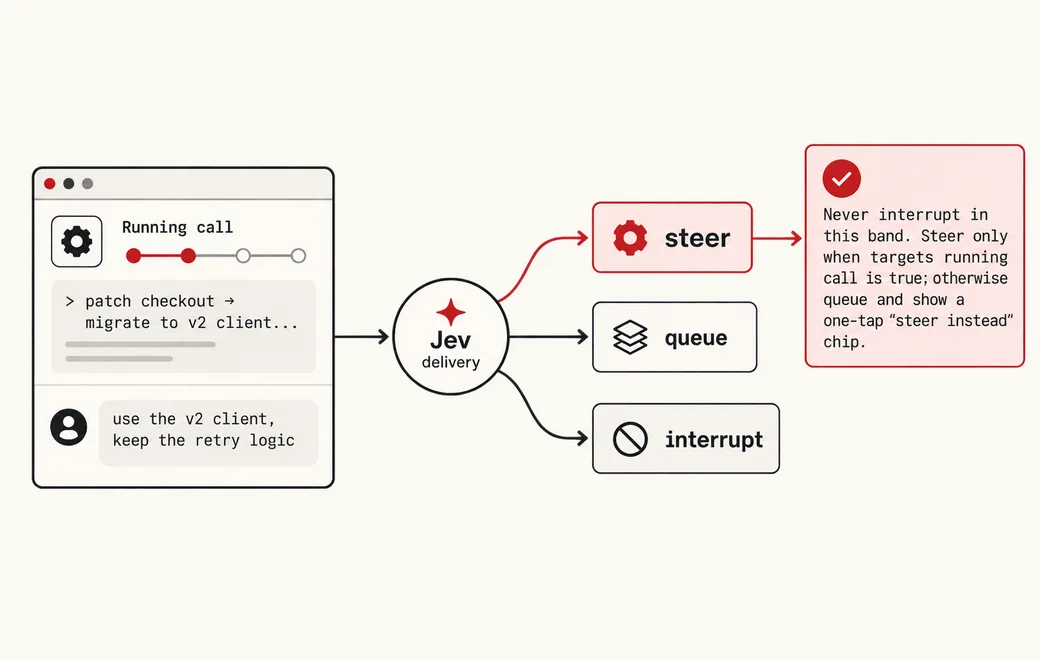
- 01Running call + messageTool in flight, new user textInput
- 02Deliverysteer / queue / interruptJev
- 03RelevanceScore + targets_running_callJev
- 04Code gateInject, enqueue, or stopYour code
Question shape
{
  "delivery": {
    "type": "choice",
    "instructions": "A tool call is running and the user just sent a new message. How should the harness deliver it? Prefer steer when the message corrects or adds context to the step in flight; queue when it is a separate follow-up; interrupt only when the user clearly asks to stop or the running work is now wrong.",
    "criteria": {
      "steer": "The message corrects, narrows, or adds context to the running tool call; inject it at the next step and keep the work in flight",
      "queue": "The message is a new or follow-up task that does not change the current step; deliver it after the run finishes",
      "interrupt": "The user asks to stop, cancel, or restart, or the running call is now clearly wasted or harmful"
    }
  },
  "relevance": {
    "type": "score",
    "instructions": "How strongly does the new message bear on the tool call that is running right now, based only on the running call and the message text provided.",
    "criteria": [
      "low",
      "medium",
      "high"
    ]
  },
  "targets_running_call": {
    "type": "noul",
    "instructions": "The message refers to the file, command, target, or goal of the running tool call—true only when there is a concrete link, not just the same project."
  }
}
Gate policy
≥ 0.90
Honor delivery: steer into the running turn, queue as the next run, or interrupt only when targets_running_call is true or the user said stop.
0.65–0.90
Never interrupt in this band. Steer only when targets_running_call is true; otherwise queue and show a one-tap "steer instead" chip.
< 0.65
Queue by default (no work lost) and log the probabilities for review of the delivery policy.
Failure modes
Pre-launch checks before you trust auto-routing:
- Queuing a correction, so the agent finishes seven files with the wrong client and the user waits for a redo;
- Interrupting on every new message and throwing away work in flight that the user wanted kept;
- Steering a brand-new task into an unrelated running call and corrupting its context;
- Spending a full planner-model turn just to decide where one sentence goes;
- Letting Jev cancel or approve tools itself—delivery only; stop and permission logic stay in the harness;
FAQ
What is the difference between steer, queue, and interrupt?
Steer injects the message into the running turn at its next step, so the agent corrects course and keeps its work in flight. Queue waits for the current run to finish and delivers the message as the next run. Interrupt stops the run now and starts over, losing in-flight work.
Why not just ask the planner model where the message goes?
It adds a full chat turn of latency and cost to every mid-run message, and the answer is free text you still have to parse. Jev returns a calibrated choice over the three options your harness already supports, fast enough to run on every keystroke-send, and small decision models can even run locally.
What does the Flatkey call look like?
POST https://router.flatkey.ai/api/alpha/decisions with Authorization: Bearer …, Content-Type: application/json, and a body of state, model (typesafe/jev-1.13), and questions (choice / score / noul). This is not an OpenAI-compatible /v1 chat endpoint.
Can I bring my own API key?
Yes. Try the free demo above without signing in. To run it live on your own text, sign in with Google and connect a Flatkey or OpenRouter key (a quick test call runs when you save it). Manage or delete it anytime under Dashboard → BYOK. Keys are stored encrypted on the server, used only for runs you trigger, and never sent back to the browser. Need a Flatkey key? Get one for Jev 1.13 on Flatkey.
Is this the official TypeSafe Jev product page?
No. jev-llm.com is an independent research and practice site. Verify pricing, models and terms at the original TypeSafe sources.
Sources
Peter Steinberger's OpenClaw shipped the same idea into a coding agent this week: a lab feature that uses a small decision model to automatically choose between steering a running tool call or queuing the next message, with support for local models over ONNX.
— @stretchcloud View the post on X →
Wire this gate with your own key
Bring your own key through Flatkey / OpenRouter. Keep exact checks in code.